Best Gaming Headset for PS5 and PS5 Pro: 5 Picks Compared (2026)
Quick answer: The best gaming headset for PS5 is the Sony INZONE H9 II: it's very light, cancels noise well, and keeps a low-latency 2.4GHz link to the console while staying connected to your phone. The Sony Pulse Elite is the best-value official PlayStation headset, and the HyperX Cloud III S Wireless lasts the longest between charges.
We earn a commission when you buy through links on this page, at no extra cost to you. Brands can't pay to be ranked. How we review products
The PS5 doesn't send game audio over Bluetooth, so a PS5 headset needs either a USB wireless dongle or a wired 3.5mm plug for the controller. After that, the things that separate a good headset from a great one are comfort over long sessions, battery life, mic clarity and whether it can stay connected to your phone at the same time. We compared five headsets on exactly those points, then looked at what users report after weeks of use.
This guide is for PS5 and PS5 Pro players who want better game audio and clearer party chat than the controller's built-in speaker and mic can give. Picks cover wireless and wired, from a premium noise-cancelling model to a budget headset that plugs straight into the DualSense. Still choosing a screen? Start with our best monitor for PS5 picks.
Best PS5 headsets at a glance
 Best battery lifeCheck price
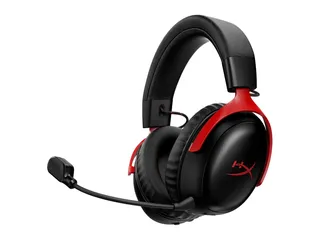
HyperX Cloud III S Wireless
Up to 120 hours on 2.4GHz, plus Bluetooth for your phone.
 Best multi-platformCheck price
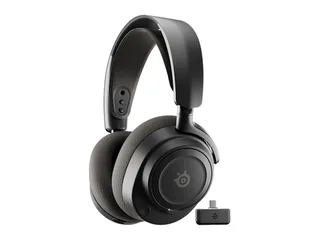
SteelSeries Arctis Nova 7P Gen 2
50+ hours of battery, with game audio and phone calls at once.
PS5 headset comparison table
Connection type decides how a headset works with the PS5: a USB dongle or a 3.5mm plug in the controller. Battery is the next biggest difference.
| Headset | Best for | Connection | Battery | Drivers | Noise cancelling |
|---|---|---|---|---|---|
 | Overall | 2.4GHz + Bluetooth + wired | Up to 30 hrs | 30mm dynamic | Yes |
 | PS5 value | PS Link + Bluetooth + 3.5mm | Up to 30 hrs | Planar magnetic | No |
 | Battery life | 2.4GHz + Bluetooth | Up to 120 hrs | 53mm dynamic | No |
 | Multi-platform | 2.4GHz + Bluetooth + 3.5mm | 50+ hrs | 40mm dynamic | No |
 | Budget wired | 3.5mm wired | No battery | 40mm dynamic | No |
The 5 best gaming headsets for PS5 reviewed
Ranked by how well each headset balances sound, comfort and PS5 features for its price.
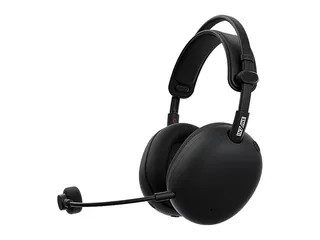
1Sony INZONE H9 IIBest wireless noise-cancelling gaming headset for PS5
Very light wireless headset with ANC and WH-1000XM6 drivers.

Our score
- Sound
9.5 9.5- Comfort
9.6 9.6- Value
7.8 7.8
Best for: Long sessions where comfort and noise cancelling matter, plus phone calls through the same headset.
Sony put the 30mm drivers from its WH-1000XM6 headphones into this wireless noise-cancelling gaming headset for PS5, and it's the most refined-sounding pick here. At around 260 grams it's also one of the lightest, which shows in long sessions. A USB-C dongle gives a low-latency 2.4GHz link to the console while Bluetooth stays connected to your phone, and active noise cancelling quiets fans, family and street noise.
Most users notice the weight first: it's light enough that it's easy to forget it's on during long sessions. Noise cancelling and the mic's AI noise reduction work well, and a five-minute quick charge adds about an hour of play when the battery runs flat.
A few users have reported the dongle dropping out on PCs, and PS5 players who liked the original H9's on-headset chat mix should know that game and chat balance now lives in the PS5's Control Center. It pairs naturally with the Sony INZONE M9 II if you're building an all-INZONE setup.
Reasons to buy
- Very light and comfortable for long sessions
- Active noise cancelling
- Simultaneous 2.4GHz and Bluetooth
- Five-minute quick charge adds about an hour
Reasons to avoid
- Rated 30-hour battery is average for the price
- Game and chat balance buttons work on PC only
- Premium price
Specifications
- Drivers
- 30mm carbon composite (same as WH-1000XM6)
- Connection
- 2.4GHz USB-C dongle, Bluetooth, wired
- Battery
- Up to 30 hours
- Noise cancelling
- Yes, active
- Mic
- Cardioid boom mic with AI noise reduction
- Weight
- About 260g without the mic
Buy it if...
- You play long sessions At about 260 grams it's one of the lightest wireless headsets in this guide.
- Your room is noisy Active noise cancelling quiets fans, family and street noise.
Don't buy it if...
- You want the most battery for the money The rated 30 hours is average; the HyperX Cloud III S Wireless lasts up to 120 hours.
- You liked an on-headset game and chat mix The balance buttons work on PC only; on PS5 the mix lives in the Control Center.
Bottom line: The headset to get when comfort over long sessions and noise cancelling matter most.
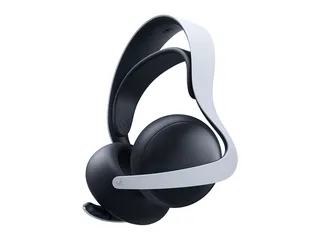
2Sony Pulse EliteBest official PlayStation headset with planar drivers
Planar magnetic drivers, PlayStation Link and a retractable mic.

Our score
- Sound
9.2 9.2- Comfort
8.6 8.6- Value
9.2 9.2
Best for: PS5 and PS Portal owners who want the most detailed sound for the money.
Planar magnetic drivers usually live in audiophile headphones, and the Pulse Elite brings them to an official PlayStation headset at a mid-range price. PlayStation Link gives a fast, stable connection to the PS5 and also works with PS Portal, while Bluetooth handles your phone. The mic slides out of the earcup only when you need it, and the included charging hanger keeps it topped up between sessions.
Users single out the detail from the planar drivers and the comfort of the earcups, and the charging hanger quickly becomes part of the routine. Some users have reported occasional connection drops, including with a PS5 Pro, and there's no transparency mode for hearing the room. It's also our suggested partner for the Alienware AW3225QF, which has no built-in speakers.
Reasons to buy
- Detailed sound from planar magnetic drivers
- PlayStation Link for PS5 and PS Portal
- Retractable mic and charging hanger
- Quick top-up on the hanger
Reasons to avoid
- No active noise cancelling or transparency mode
- Some users report connection drops
- The styling won't suit everyone
Specifications
- Drivers
- Planar magnetic
- Connection
- PlayStation Link (2.4GHz), Bluetooth, 3.5mm
- Battery
- Up to 30 hours
- Noise cancelling
- No (AI noise rejection on the mic)
- Mic
- Retractable boom mic
- Extras
- Charging hanger, works with PS Portal via PlayStation Link
Buy it if...
- You own a PS Portal PlayStation Link connects to both the PS5 and PS Portal with no extra adapter.
- Sound detail matters most at this price Planar magnetic drivers are rare in mid-range headsets and give noticeably detailed sound.
Don't buy it if...
- You need noise cancelling There's no active noise cancelling or transparency mode; the Sony INZONE H9 II has ANC.
- You need a rock-solid connection Some users have reported occasional dropouts, including with a PS5 Pro.
Bottom line: The best value for PS5 and PS Portal owners who want detailed sound and a clean, official setup.
3HyperX Cloud III S WirelessBest long-battery wireless headset for PS5
Up to 120 hours on 2.4GHz, plus Bluetooth for your phone.

Our score
- Sound
8.4 8.4- Comfort
8.8 8.8- Value
9 9
Best for: Players who hate charging and want a comfortable wireless headset that also connects to a phone.
Battery life is the headline: HyperX rates the Cloud III S Wireless for up to 120 hours on its 2.4GHz connection and up to 200 hours over Bluetooth, so most players charge it every week or two. It keeps the memory-foam comfort the Cloud line is known for and adds the Bluetooth that the original Cloud III Wireless lacked, so your phone can stay connected while you play.
HyperX lists support for PS5, PS4, PC, Mac, Switch and mobile, and includes a USB-C to USB-A adapter for the dongle. Detach the boom mic and two built-in mics still pick up your voice, which is handy when you take it out with a phone.
Battery life and the memory-foam earcups are its biggest strengths, in line with the Cloud line's reputation. Some users find it gets warm in long sessions, and there's no active noise cancelling. Bluetooth was the most requested addition to the Cloud III Wireless it replaces, and this version finally adds it.
Reasons to buy
- Up to 120 hours on 2.4GHz, 200 on Bluetooth
- 2.4GHz and Bluetooth in one headset
- Built-in mics as a backup when the boom is detached
Reasons to avoid
- Heavier than the Sony picks
- No active noise cancelling
- Can feel warm in long sessions
Specifications
- Drivers
- 53mm angled dynamic
- Connection
- 2.4GHz dongle (USB-C with USB-A adapter), Bluetooth
- Battery
- Up to 120 hours (2.4GHz), up to 200 hours (Bluetooth)
- Noise cancelling
- No
- Mic
- Detachable boom mic plus two built-in mics
- Warranty
- 2 years
Buy it if...
- You hate charging Up to 120 hours on 2.4GHz means plugging in every week or two for most players.
- You want phone audio too Bluetooth connects your phone, which the older Cloud III Wireless couldn't do.
Don't buy it if...
- Weight bothers you At about 340 grams it's noticeably heavier than the Sony INZONE H9 II.
- Your ears run warm Some users find it gets warm in long sessions, and there's no noise cancelling.
Bottom line: The headset for players who never want to think about charging, now with the Bluetooth the older model lacked.
4SteelSeries Arctis Nova 7P Gen 2Best multi-platform wireless headset for PS5 and Switch
50+ hours of battery, with game audio and phone calls at once.

Our score
- Sound
8.6 8.6- Comfort
8.8 8.8- Value
8.4 8.4
Best for: Players who switch between PS5, PC and Switch and want one headset for all of them.
Gen 2 of this multi-platform wireless headset for PS5 and Switch adds roughly 40% more battery, now rated for more than 50 hours, and keeps the simultaneous 2.4GHz and Bluetooth connection that lets you hear game audio and a phone call at once. Its USB-C dongle moves easily between a PS5, a PC and a Switch dock, and the retractable mic tucks away when you just want to listen.
A 15-minute charge adds about six hours of play, and SteelSeries' Arctis app gives game and phone audio their own EQ, with presets for more than 200 games. Gen 2 keeps the sound and design of the original Nova 7P, which users rate highly for sound and battery, though opinions on the mic are mixed. Gen 1 looks almost identical, so check the listing says Gen 2 before you buy.
Reasons to buy
- 50+ hours of battery with fast charging
- Simultaneous 2.4GHz and Bluetooth
- Easy to move between PS5, PC and Switch
Reasons to avoid
- No active noise cancelling
- Opinions on the mic are mixed
- Gen 1 looks almost identical, so check which one you're buying
Specifications
- Drivers
- 40mm dynamic
- Connection
- 2.4GHz USB-C dongle, Bluetooth, 3.5mm
- Battery
- 50+ hours; 15-minute charge for about 6 hours
- Noise cancelling
- No
- Mic
- Retractable boom mic
- Works with
- PS5, PC, Switch, Meta Quest, mobile
Buy it if...
- You switch between PS5, PC and Switch The USB-C dongle moves easily between consoles, a PC and handhelds.
- You take calls while you play Simultaneous 2.4GHz and Bluetooth let you hear the game and your phone at once.
Don't buy it if...
- Mic quality is a priority Opinions on the mic are mixed; the Sony INZONE H9 II's mic is the stronger choice.
- You need noise cancelling There's no ANC on this model.
Bottom line: One headset for PS5, PC and Switch, with battery life that outlasts most rivals.
5SteelSeries Arctis Nova 1PBest budget wired headset for PS5
Plugs into the DualSense: no charging, no dongle.

Our score
- Sound
7.6 7.6- Comfort
8.8 8.8- Value
9.6 9.6
Best for: A first PS5 headset, a backup for a second controller, or kids' setups where charging gets forgotten.
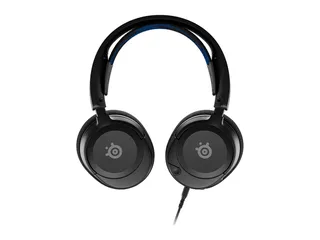
Plugging straight into the DualSense controller, this budget wired headset for PS5 needs no charging, no dongle and no pairing. It borrows the comfortable Arctis Nova design from SteelSeries' pricier models, with height-adjustable rotating earcups and a ClearCast mic that cuts background noise. At about 253 grams it's light enough for long sessions, and the same 3.5mm plug works with a Switch, a PC or a phone.
The PS5's Tempest 3D Audio works through it like any stereo headset, so going wired and cheap doesn't cost you positional sound. Users like the sound, the comfort and the retractable mic, and the plug-in-and-play setup is a big part of the appeal. Opinions on the cable length are split: some find it just right for sitting close to the TV, others want more slack.
Reasons to buy
- No battery to charge
- Light and comfortable
- Works with almost any device that has a 3.5mm jack
Reasons to avoid
- Wired only
- Analog only, so no app EQ or surround features
- The cable can snag when you move around
Specifications
- Drivers
- 40mm dynamic
- Connection
- Wired 3.5mm
- Battery
- None needed
- Noise cancelling
- No
- Mic
- Retractable ClearCast Gen 2 mic with AI noise cancelling
- Weight
- About 253g
Buy it if...
- You don't want to charge anything It plugs into the DualSense controller's 3.5mm jack and runs from it.
- You're buying for kids or a second controller It's light, cheap and has nothing to lose or forget to charge.
Don't buy it if...
- You move around a lot while you play The cable can snag; a wireless pick like the SteelSeries Arctis Nova 7P Gen 2 avoids that.
- You want app EQ or surround features It's analog only, though the PS5's 3D Audio still works through it.
Bottom line: The easiest first PS5 headset: plug it into the controller and play.
How to choose the best gaming headset for PS5
These are the specs that change how a headset works with a PlayStation.
Check how it connects to the PS5
The PS5 doesn't support Bluetooth headphones for game audio. Wireless headsets need a USB dongle (2.4GHz or PlayStation Link), while wired headsets plug into the 3.5mm jack on the DualSense. Many wireless headsets also have Bluetooth, which is useful for staying connected to your phone at the same time.
3D Audio works with any headset
The PS5's Tempest 3D Audio works with any stereo headphones, wired or wireless, so you don't need a headset with its own surround processing. Turn it on in the PS5's sound settings and adjust the 3D audio profile for the best result.
Battery life: how many hours do you need?
Around 30 hours covers a week of evening sessions for most players. If you'd rather charge every couple of weeks, look for 50 hours or more. Quick-charge features matter too: a few minutes on the cable can save a session when the battery runs flat.
Noise cancelling vs an open room
Active noise cancelling helps in loud homes and shared rooms, but it adds cost and uses battery. If you play in a quiet room, good closed-back earcups block enough noise on their own.
Comfort and weight
Weight matters more than most specs over a three-hour session. Headsets around 250 to 270 grams feel noticeably lighter than ones over 320 grams, and soft memory-foam or fabric earcups reduce heat and pressure.
PS5 Pro and PS Portal
Any headset that works with a PS5 also works with a PS5 Pro. For PS Portal, PlayStation Link headsets like the Pulse Elite connect wirelessly, and wired headsets plug into its 3.5mm jack.
Best PS5 audio settings for a gaming headset
After you connect your headset, these settings get the most from it.
- Plug in the wireless dongle or connect the 3.5mm plug to the DualSense controller.
- Open Settings > Sound > Audio Output and make sure the headset is the output device.
- Turn on Enable 3D Audio for Headphones, then run Adjust 3D Audio Profile and pick the option that sounds most natural to you.
- Press the PS button, open Sound in the Control Center, and set the balance between game audio and voice chat.
- Check the mic level under Settings > Sound > Microphone so your party can hear you clearly.
Tip: Leave the in-game audio mix on Headphones where a game offers it, so its own processing doesn't clash with 3D Audio.
Other PS5 headsets we considered
HyperX Cloud III Wireless
Our previous battery-life pick. HyperX has replaced it with the Cloud III S Wireless, which keeps the 120-hour rating and adds Bluetooth for about the same price.
Sony INZONE H3
A light, wired Sony headset for PS5. Users often mention lighter bass, and the Arctis Nova 1P costs less for similar comfort.
Sony INZONE H9 (original)
Still a good noise-cancelling PS5 headset if heavily discounted, but the H9 II is lighter, and some users have reported the original's earpads wearing out within months.
How we chose these PS5 headsets
We shortlisted headsets that are widely sold online and work with PS5 out of the box, then compared each one on connection type, battery life, weight, mic and noise cancelling using the maker's published specs, plus what users report after weeks of use. Subscores rate sound, comfort and value; the overall score also considers PS5-specific features.
Best gaming headset for PS5 FAQs
What is the best gaming headset for PS5?
The Sony INZONE H9 II is the best gaming headset for PS5 for most people who can spend more. It's very light, has active noise cancelling, and connects to the PS5 over a low-latency 2.4GHz dongle while staying connected to your phone over Bluetooth.
Does the PS5 support Bluetooth headphones?
Not for game audio. The PS5 needs a headset with a USB wireless dongle, a PlayStation Link adapter, or a wired 3.5mm connection to the controller.
Do I need a special headset for PS5 3D Audio?
No. The PS5's 3D Audio works with any stereo headphones, wired or wireless. Turn it on under Settings, Sound, Audio Output.
Can I plug a wired headset into the PS5 controller?
Yes. Any headset with a single 3.5mm plug works in the DualSense controller's headphone jack, including for voice chat.
Which PS5 headsets work with PS Portal?
Headsets with PlayStation Link, like the Pulse Elite, connect to PS Portal wirelessly. Wired headsets work through the Portal's 3.5mm jack.
Is the Pulse Elite better than the INZONE H9 II?
The Pulse Elite has more detailed planar drivers and PlayStation Link for PS Portal, at a lower price. The INZONE H9 II is lighter and adds active noise cancelling. Choose the Pulse Elite for value and PS Portal, and the H9 II for comfort and noisy rooms.
Sources
Update history
- Replaced the HyperX Cloud III Wireless with its successor, the Cloud III S Wireless. Rebuilt every review in our new format with product photos, buy-it-if guidance and user feedback written into each review.
- First published with five picks.


