Best Gaming Monitor for GTA 6: 5 HDR Picks for PS5 and Xbox (2026)
Quick answer: The best gaming monitor for GTA 6 is the BenQ MOBIUZ EX321UX. Its 32-inch 4K mini-LED panel reaches 1,000 nits with 1,152 dimming zones, which is what makes Vice City's sunsets and neon nights look right in HDR, and it takes a PS5 and an Xbox over HDMI 2.1 at the same time. For the deepest blacks, pick the Alienware AW3225QF QD-OLED, and for a bright HDR picture on a budget, the 1440p AOC Q27G3XMN.
We earn a commission when you buy through links on this page, at no extra cost to you. Brands can't pay to be ranked. How we review products
GTA 6 changes what matters in a console monitor. It runs at 30fps on the PS5, PS5 Pro and Xbox Series X|S, with no 60fps mode, so a 144Hz or 240Hz refresh rate does nothing for it. What you will notice is HDR: the game uses ray-traced lighting on every console, and Vice City is built around bright skies, reflections and neon at night. We picked these monitors for HDR brightness, contrast and how they handle a 30fps picture, then checked each one against what users report after living with it.
This guide is for PS5, PS5 Pro and Xbox Series X|S players who want GTA 6 to look its best at a desk. Every pick also works with a PC, which matters if you plan to buy GTA 6 again when a PC version arrives; our best GPU for GTA 6 guide covers that side. Looking at a screen just for PS5? Our best monitor for PS5 guide puts 120Hz games first.
Best gaming monitors for GTA 6 at a glance
 Best overallCheck price
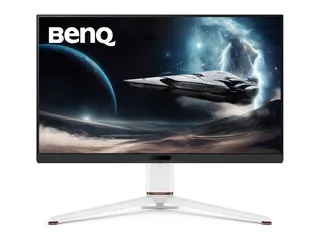
BenQ MOBIUZ EX321UX
32-inch 4K mini-LED with 1,000-nit HDR and HDMI 2.1 for both consoles.
 Best big screenCheck price
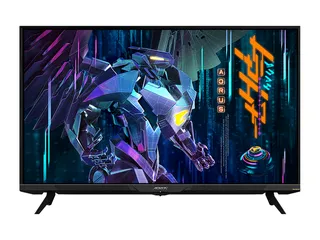
Gigabyte AORUS FV43U
43-inch 4K with DisplayHDR 1000 for a TV-sized Vice City at your desk.
Best gaming monitors for GTA 6 compared
For GTA 6, the HDR and Dimming columns matter most: they show how bright highlights get and how well the monitor holds dark areas next to bright ones.
| Monitor | Best for | Size and panel | Console max | HDMI 2.1 | Dimming | HDR |
|---|---|---|---|---|---|---|
 | Overall | 32" IPS mini-LED | 4K 120Hz | Yes | 1,152 zones | DisplayHDR 1000 |
 | OLED picture | 32" QD-OLED, curved | 4K 120Hz | Yes | Per-pixel | True Black 400 |
 | Big screen | 43" VA, quantum dot | 4K 120Hz | Yes | Edge-lit | DisplayHDR 1000 |
 | PS5 owners | 27" IPS | 4K 120Hz | Yes | Full-array | DisplayHDR 600 |
 | Budget | 27" VA mini-LED | 1440p 60Hz | No | 336 zones | DisplayHDR 1000 |
The 5 best gaming monitors for GTA 6 reviewed
Ranked by how good GTA 6 looks on each monitor for the money, with console features as the tiebreaker.
1BenQ MOBIUZ EX321UXBest gaming monitor for GTA 6 overall
32-inch 4K mini-LED with 1,000-nit HDR and HDMI 2.1 for both consoles.

Our score
- HDR picture
9.5 9.5- Console features
9.2 9.2- Value
8.6 8.6
Best for: Players who want GTA 6's HDR lighting at full strength on a desk-sized 4K screen, with room for both a PS5 and an Xbox.
BenQ's EX321UX is the 4K mini-LED monitor for GTA 6 we'd buy for a PS5 Pro or Xbox Series X. Its 31.5-inch IPS panel is lit by 1,152 dimming zones and rated DisplayHDR 1000, with a 1,000-nit peak, so the game's ray-traced lighting has room to breathe: bright skies don't clip to flat white, and car headlights stand out against a dark road. BenQ lists 4K at 120Hz with HDR for the PS5 and Xbox Series X, an HDMI 2.1 port with eARC for sending audio to a soundbar, DisplayPort 2.1, USB-C with 65W charging and a built-in KVM switch. Color covers 99% of P3 and Adobe RGB, which shows in the pastel Vice City skyline.
Mini-LED has a familiar trade-off, and some users reported a faint glow around white subtitles and the minimap in very dark scenes. It's far less obvious than on edge-lit monitors and rarely distracting in a game as bright as GTA 6. Some users also mention that the HDR presets are worth tweaking rather than leaving on the default, and that the white stand takes up a fair amount of desk depth. Because it's an LCD, 30fps camera pans look smoother than on an OLED, which suits a game locked to 30fps.
Reasons to buy
- 1,000-nit HDR with 1,152 dimming zones
- 4K 120Hz HDR on PS5 and Xbox Series X
- eARC passes console audio to a soundbar
- 99% P3 and Adobe RGB color
Reasons to avoid
- Mini-LED blooming shows around subtitles on dark scenes
- Large stand footprint
- HDR presets need some tuning
Specifications
- Screen
- 31.5-inch IPS, 1,152-zone mini-LED
- Resolution
- 3840 x 2160 (4K)
- Refresh rate
- 144Hz, 1ms
- Console output
- 4K at 120Hz with HDR on PS5 and Xbox Series X
- Ports
- HDMI 2.1 with eARC, DisplayPort 2.1, USB-C 65W, KVM
- HDR
- VESA DisplayHDR 1000, 1,000 nits peak
Buy it if...
- You want GTA 6's HDR to really shine A 1,000-nit peak with 1,152 dimming zones gives sunsets, headlights and neon real brightness while dark streets stay dark.
- Your desk hosts a console and a PC HDMI 2.1 handles the PS5 or Xbox at 4K 120Hz, while DisplayPort 2.1, USB-C and the KVM switch take care of a PC or laptop.
Don't buy it if...
- You want perfect black in night scenes Local dimming can't match the per-pixel contrast of the Alienware AW3225QF OLED.
- Your desk is shallow A 32-inch screen on a wide stand needs depth, so measure before you buy.
Bottom line: The best all-round GTA 6 monitor: bright, contrasty HDR, sharp 4K and console-friendly HDMI 2.1 in one 32-inch screen.
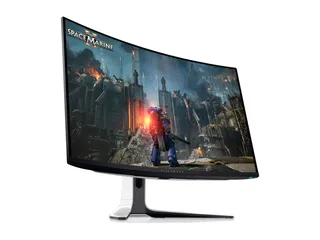
2Alienware AW3225QFBest OLED monitor for GTA 6
32-inch curved 4K QD-OLED with Dolby Vision and burn-in warranty.

Our score
- HDR picture
9.4 9.4- Console features
9 9- Value
8.2 8.2
Best for: Players who spend most of their GTA 6 time in night-time Vice City and want inky blacks.
For contrast, nothing on this list matches this 4K QD-OLED monitor for GTA 6 night scenes. Every pixel makes its own light, so neon signs, headlights and lit windows sit against true black, and the 1700R curve wraps the 32-inch screen gently around your view. Dell lists 4K at 120Hz, VRR and ALLM over two HDMI 2.1 FRL ports, so a PS5 and an Xbox can both stay connected, and one port supports eARC for a soundbar. Dolby Vision support is a bonus for films on an Xbox or streaming stick.
There are two catches for this particular game. The first is motion: at 30fps, OLED's near-instant pixel response turns camera pans into visible steps, and some users reported that slow-paced, locked-30 games look choppier on it than on their old LCD. Leaving GTA 6's motion blur on helps a lot. The second is burn-in, since the minimap and HUD sit in the same spot for hours. Dell's three-year warranty covers it, and some users reported turning off automatic input switching because the monitor jumps away from the PS5 when the screen goes black. There are no speakers, so pair it with a headset such as the Sony Pulse Elite or a soundbar on the eARC port.
Reasons to buy
- Per-pixel contrast makes night scenes look stunning
- Two HDMI 2.1 ports for a PS5 and an Xbox
- Three-year warranty covers OLED burn-in
Reasons to avoid
- 30fps pans show more judder than on an LCD
- The GTA 6 HUD is a burn-in risk over long play
- Bright daytime scenes are dimmer than on mini-LED
Specifications
- Screen
- 31.6-inch QD-OLED, 1700R curve
- Resolution
- 3840 x 2160 (4K)
- Refresh rate
- 240Hz, 0.03ms GtG
- Console output
- 4K at 120Hz with VRR and ALLM
- Ports
- 2x HDMI 2.1 FRL (one with eARC), 1x DisplayPort 1.4
- HDR
- DisplayHDR True Black 400, Dolby Vision
Buy it if...
- You play GTA 6 mostly at night Each pixel switches off completely, so dark streets, interiors and the night sky show true black with no glow.
- You want peace of mind on burn-in Dell's three-year warranty covers burn-in, which matters with a minimap and HUD on screen for hours.
Don't buy it if...
- 30fps judder bothers you OLED's instant response makes camera pans look steppier at 30fps than they do on the BenQ MOBIUZ EX321UX.
- You want the brightest daytime HDR Full-screen brightness is lower than a DisplayHDR 1000 mini-LED, so sunny beach scenes have less punch.
Bottom line: The best-looking GTA 6 monitor in a dark room, as long as you keep motion blur on and take the burn-in warranty seriously.
3Gigabyte AORUS FV43UBest big-screen monitor for GTA 6
43-inch 4K with DisplayHDR 1000 for a TV-sized Vice City at your desk.

Our score
- HDR picture
8.9 8.9- Console features
8.8 8.8- Value
8.3 8.3
Best for: Players who want a TV-sized GTA 6 screen on a deep desk or in a small room.
Sitting halfway between a monitor and a TV, the FV43U is the 43-inch 4K monitor for GTA 6 to choose when your desk is deep or you play from a bed a few feet away. Its DisplayHDR 1000 rating means sunlit beaches and neon signs get much brighter than on most monitors, and the VA panel's 4000:1 native contrast keeps night scenes from looking washed out. Gigabyte lists HDMI 2.1 with VRR and ALLM on two ports, plus DisplayPort and USB-C with a KVM switch for a PC or laptop, and its two 12W speakers are loud enough to play without a headset.
The trade-offs are the usual ones for a big VA panel. Some users reported dark smearing behind fast motion and, on some units, brightness flicker in dark scenes with VRR on, which you can avoid by turning VRR off since GTA 6 holds 30fps most of the time. Because the backlight isn't full-array, bright objects on black backgrounds don't pop the way they do on the BenQ, but on a screen this size the overall impact makes up for it. Measure your desk depth before buying.
Reasons to buy
- Bright DisplayHDR 1000 picture
- High native contrast for an LCD
- Two HDMI 2.1 ports and decent built-in speakers
Reasons to avoid
- Too big for a shallow desk
- VA smearing in fast, dark scenes
- Some users report flicker with VRR in dark scenes
Specifications
- Screen
- 43-inch VA, quantum dot, 4000:1 contrast
- Resolution
- 3840 x 2160 (4K)
- Refresh rate
- 144Hz (120Hz for consoles)
- Console output
- 4K at 120Hz with VRR and ALLM
- Ports
- 2x HDMI 2.1, 1x DisplayPort 1.4, USB-C
- HDR
- VESA DisplayHDR 1000, 1,000 nits peak
Buy it if...
- You want GTA 6 big without buying a TV At 43 inches, Leonida's skyline fills your view, and DisplayHDR 1000 keeps highlights bright.
- Your PS5 and Xbox share one screen Both HDMI 2.1 ports carry 4K 120Hz with VRR, so neither console needs a slower input.
Don't buy it if...
- You sit close to a shallow desk A 43-inch screen at arm's length is hard to take in, so the 32-inch BenQ MOBIUZ EX321UX suits most desks better.
- You're sensitive to dark smearing VA panels can leave trails behind fast motion in dark areas, which shows when driving at night.
Bottom line: The easiest way to get a big, bright GTA 6 picture on a desk, with two HDMI 2.1 ports for both consoles.
4Sony INZONE M9 IIBest monitor for GTA 6 on PS5
27-inch 4K IPS that sets GTA 6's HDR up for you on a PS5.

Our score
- HDR picture
8.6 8.6- Console features
9.6 9.6- Value
8.5 8.5
Best for: PS5 and PS5 Pro owners who want GTA 6's HDR calibrated automatically on a compact 27-inch 4K screen.
Sony made the M9 II for PS5 owners, and that pays off in GTA 6. Connect a PS5 or PS5 Pro and Auto HDR Tone Mapping sets the console's HDR range to match the monitor, so you can skip most of the HDR calibration fiddling, while Auto Genre Picture Mode switches to a game preset when GTA 6 starts. Both HDMI ports are full HDMI 2.1 with 4K 120Hz and VRR, and full-array local dimming gives highlights more punch than an edge-lit 27-inch monitor. On a 27-inch screen, 4K looks very sharp, which flatters the PS5 Pro's PSSR upscaling.
Its HDR is rated DisplayHDR 600, so the brightest moments in GTA 6 won't hit as hard as on the DisplayHDR 1000 picks above, and some users reported a faint halo around bright objects on dark backgrounds from the local dimming. Some users have also reported thin built-in speakers and no USB-C port for charging a controller, so most pair it with a headset such as the Sony INZONE H9 II. Xbox players can use it too, but the auto-setup features are PS5-only.
Reasons to buy
- Auto HDR Tone Mapping sets HDR up with a PS5
- Two HDMI 2.1 ports for 4K 120Hz and VRR
- Full-array local dimming
Reasons to avoid
- HDR is dimmer than DisplayHDR 1000 picks
- Auto features don't work with an Xbox
- Built-in speakers are thin
Specifications
- Screen
- 27-inch IPS, full-array local dimming
- Resolution
- 3840 x 2160 (4K)
- Refresh rate
- 160Hz (DisplayPort), 144Hz (HDMI)
- Console output
- 4K at 120Hz with VRR
- Ports
- 2x HDMI 2.1, 1x DisplayPort 2.1
- HDR
- VESA DisplayHDR 600
Buy it if...
- You play GTA 6 on a PS5 or PS5 Pro Auto HDR Tone Mapping reads the monitor's capabilities and sets the console's HDR range for you.
- Your desk only fits 27 inches 4K on a 27-inch screen is very sharp, which shows off the PS5 Pro's PSSR upscaling.
Don't buy it if...
- You also play on an Xbox The automatic PS5 features don't apply to Xbox, so the BenQ MOBIUZ EX321UX is better value for mixed setups.
- You want the brightest HDR DisplayHDR 600 can't match the 1,000-nit highlights of the BenQ or Gigabyte AORUS FV43U.
Bottom line: The no-fuss GTA 6 monitor for PlayStation owners: plug in the PS5 and the HDR setup is done for you.
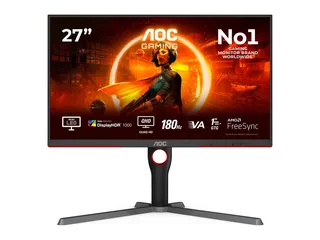
5AOC Q27G3XMNBest budget HDR monitor for GTA 6
27-inch 1440p mini-LED with real DisplayHDR 1000 at a budget price.

Our score
- HDR picture
8.5 8.5- Console features
7.6 7.6- Value
9.4 9.4
Best for: Players who want real HDR for GTA 6 without paying for 4K, and who don't need 120Hz for other console games.
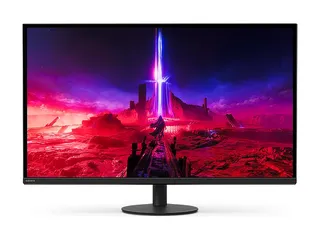
This is the budget monitor for GTA 6 that gets HDR right. AOC pairs a 27-inch 1440p VA panel with 336 mini-LED dimming zones and DisplayHDR 1000 certification, and the VA panel's 4000:1 native contrast keeps dark streets from turning grey, which is unusual at this price. Because the PS5 renders GTA 6 at around 1440p, a QHD screen loses very little sharpness compared with 4K at 27 inches, and both the PS5 and Xbox Series X|S output 1440p directly.
The compromises are in the connections. There's one HDMI port and it's HDMI 2.0, so consoles run at 60Hz with no VRR. That makes no difference to GTA 6 at 30fps, but you'll miss 120fps modes in other games, and two consoles mean swapping cables. Some users reported blooming around bright objects on black backgrounds, which is expected with 336 zones, and that local dimming and HDR settings are worth adjusting in the menu rather than leaving on default. On a PC over DisplayPort it runs at 180Hz, which keeps it useful when GTA 6 reaches PC.
Reasons to buy
- DisplayHDR 1000 at a budget price
- 4000:1 VA contrast plus 336 dimming zones
- 1440p matches GTA 6's rendering resolution on PS5
Reasons to avoid
- Only one HDMI port, and it's HDMI 2.0
- No 120Hz or VRR from consoles
- Fewer dimming zones means more visible blooming
Specifications
- Screen
- 27-inch VA, 336-zone mini-LED
- Resolution
- 2560 x 1440 (QHD)
- Refresh rate
- 180Hz, 1ms GtG
- Console output
- 1440p at 60Hz over HDMI 2.0
- Ports
- 1x HDMI 2.0, 1x DisplayPort 1.4
- HDR
- VESA DisplayHDR 1000
Buy it if...
- You want proper HDR on a tight budget DisplayHDR 1000 with mini-LED dimming is rare at this price, and it makes a clear difference in GTA 6.
- You play mostly GTA 6 and other 30 or 60fps games HDMI 2.0 is enough for 1440p at 60Hz, which covers GTA 6 completely.
Don't buy it if...
- You want 120Hz in other console games HDMI 2.0 limits consoles to 60Hz here, so pick a monitor with HDMI 2.1 such as the Sony INZONE M9 II.
- You connect two consoles With one HDMI port you'll be swapping cables or buying a switch.
Bottom line: The cheapest way to see GTA 6 in real HDR on a monitor, as long as 60Hz on one HDMI port is enough for you.
How to choose a monitor for GTA 6
GTA 6's 30fps cap means some usual monitor advice doesn't apply. These are the specs that change how the game looks.
Refresh rate doesn't matter for GTA 6
Rockstar has confirmed 30fps on the PS5, PS5 Pro and Xbox Series X|S, so GTA 6 can't use a high refresh rate. A 120Hz monitor is still worth having for other console games, and 30fps divides evenly into 60Hz and 120Hz, so frames are paced evenly. Pay for HDR and contrast before you pay for speed.
HDR brightness and local dimming come first
GTA 6 uses ray-traced global illumination and reflections on every console, and its HDR output has a wide brightness range. To see it, look for DisplayHDR 1000 on an LCD, ideally with mini-LED local dimming, or an OLED with True Black certification. DisplayHDR 400 monitors accept an HDR signal but can't get bright enough to show much difference.
4K or 1440p for GTA 6?
Digital Foundry's launch analysis found GTA 6 renders around 1440p on the PS5 and PS5 Pro, with the Pro using PSSR upscaling to get close to 4K. A 4K monitor shows the PS5 Pro and Xbox Series X at their sharpest on 27 inches and up. A 1440p monitor is a sensible way to save money, because the consoles output 1440p directly and the difference is small at 27 inches.
Mini-LED or OLED for a 30fps game
OLED pixels change almost instantly, which is great at 120fps but makes 30fps camera pans look steppy, an effect called judder. Mini-LED LCDs blur those steps slightly, so many players find 30fps easier to watch on them. OLED still wins for black levels in night scenes. Keep GTA 6's motion blur on with either type.
Do you need HDMI 2.1?
Not for GTA 6 itself, since 4K at 30 or 60fps fits within HDMI 2.0. HDMI 2.1 is what unlocks 4K at 120Hz and VRR in other PS5 and Xbox games, so it's worth having on a monitor you'll keep for years. Two HDMI 2.1 ports let a PS5 and an Xbox stay plugged in at once.
Burn-in and the GTA 6 HUD
GTA 6 keeps a minimap and HUD on screen, which is the kind of static image that can cause OLED burn-in over hundreds of hours. Choose an OLED whose warranty covers burn-in, let it run its pixel refresh, and consider shrinking or hiding HUD elements in the game's settings.
Best GTA 6 HDR settings for a gaming monitor
Set the console up first, then the game. These steps get HDR right on PS5 and Xbox.
- Connect the console with its own HDMI cable, ideally to an HDMI 2.1 port, and switch the monitor's HDR mode on in its menu.
- On PS5, open Settings > Screen and Video > Video Output, set HDR to On When Supported and run Adjust HDR. Sony INZONE monitors can skip this with Auto HDR Tone Mapping.
- On Xbox Series X|S, open Settings > General > TV & display options, turn on Auto HDR and run the HDR Game Calibration app.
- Turn on VRR on either console. GTA 6 holds 30fps most of the time, but VRR can smooth the drops in heavy scenes on monitors that support low frame rate compensation.
- In GTA 6's display settings, adjust Max Brightness to your monitor's real peak, then set Black Level and Paper White so night streets stay detailed and menus aren't glaring.
- Leave the game's motion blur on, especially on an OLED, to make 30fps camera pans look smoother.
Tip: Set the monitor to its HDR game or cinema preset rather than a bright "vivid" mode, so the console's HDR calibration isn't undone by the monitor's own processing.
Other gaming monitors for GTA 6 we considered
Samsung Odyssey Neo G7 (S32BG75)
A 32-inch curved 4K mini-LED with very high native contrast. It's been around since 2022 and is harder to find new than our picks, and its local dimming shows more blooming around bright objects than the BenQ EX321UX.
INNOCN 27M2V
A 27-inch 4K mini-LED with DisplayHDR 1000 that was a budget favorite. Some users reported having to switch HDR on manually every time, and it now often costs nearly as much as better-supported models.
ASUS TUF Gaming VG28UQL1A
Our budget 4K 120Hz pick for PS5 is a fine way to play GTA 6, but its DisplayHDR 400 rating can't show the game's HDR. The AOC Q27G3XMN costs similar money and looks much better in HDR.
How we chose these gaming monitors for GTA 6
We shortlisted monitors that are widely sold online and compared each one on the things that change how GTA 6 looks on a console: HDR brightness, local dimming or OLED contrast, how 30fps motion looks on the panel, resolution support on PS5 and Xbox, and HDMI ports. Every spec comes from the maker's official product page, and we add the strengths and problems users report after weeks of use. Subscores rate HDR picture, console features and value; the overall score weighs HDR picture most heavily.
Best gaming monitor for GTA 6 FAQs
What is the best gaming monitor for GTA 6?
The BenQ MOBIUZ EX321UX is the best gaming monitor for GTA 6 for most players. Its 4K mini-LED panel reaches 1,000 nits with 1,152 dimming zones, so the game's HDR lighting looks bright and contrasty, and it accepts a PS5 and an Xbox at the same time over HDMI 2.1.
Does GTA 6 run at 60fps on PS5 Pro?
No. Rockstar targets 30fps on the PS5, PS5 Pro and Xbox Series X|S. The PS5 Pro adds PSSR upscaling and ray-traced shadows for a sharper, cleaner picture, but its frame rate stays at 30fps.
Is a 144Hz monitor worth it for GTA 6?
Not for GTA 6 itself, because it runs at 30fps on every console. A 120Hz or 144Hz monitor is still useful for other PS5 and Xbox games that offer 120fps modes, and for a gaming PC.
Is 4K worth it for GTA 6 on console?
Yes on 27 inches and larger, especially with a PS5 Pro, which upscales GTA 6 close to 4K with PSSR. On a base PS5 the game renders around 1440p, so a good 1440p HDR monitor gives up very little.
Why does GTA 6 look choppy on my OLED monitor?
OLED pixels respond almost instantly, so the gaps between 30 frames per second show up as judder in camera pans. Keep the game's motion blur on, use the monitor's cinema or HDR game preset, and avoid sitting very close to a large OLED.
Does VRR help GTA 6?
A little. GTA 6 holds 30fps most of the time, but frame rate can dip in heavy scenes, especially on the base PS5. VRR can smooth those dips on monitors with low frame rate compensation, so it's worth leaving on.
Can I use the same monitor for GTA 6 on PC later?
Yes. Every pick in this guide has DisplayPort or USB-C for a PC as well as HDMI for consoles. A PC version of GTA 6 hasn't been announced yet, so a monitor that also runs at 144Hz on a PC keeps that option open.
Sources
Update history
- First published.


