Best Motherboard for RTX 5060: 5 Boards for AMD and Intel Builds (2026)
Quick answer: The ASUS TUF GAMING B850-PLUS WIFI is the best motherboard for the RTX 5060: its PCIe 5.0 slot gives the card its full eight-lane link, and it has Wi-Fi 7 and three M.2 slots. The MSI PRO B650M-A WIFI is the budget AM5 pick, the MSI B860 GAMING PLUS WIFI is the Intel choice, and the MSI PRO B760M-A WIFI DDR4 and ASUS TUF GAMING B550-PLUS WIFI II keep costs down with DDR4.
We earn a commission when you buy through links on this page, at no extra cost to you. Brands can't pay to be ranked. How we review products
Any motherboard with a full-length graphics slot will run an RTX 5060, but they don't all run it equally well. The card uses eight PCIe lanes instead of 16, so the generation of the slot decides how much bandwidth it gets: a PCIe 5.0 slot gives it everything it can use, PCIe 4.0 gives it half and PCIe 3.0 a quarter. That gap shows up when a game fills the card's 8GB of video memory. These five boards cover new AMD and Intel builds and cheaper DDR4 platforms, all with at least a PCIe 4.0 slot, Wi-Fi and fast M.2 storage, and the guide below explains the RTX 5060's motherboard requirements in plain terms.
This guide is for anyone building or upgrading a PC around an RTX 5060. Choose the processor first with our best CPU for RTX 5060 guide, since it decides the socket, then pick a power supply from our best PSU for RTX 5060 guide and a screen from our best monitor for RTX 5060 picks.
Best motherboards for the RTX 5060 at a glance
 Best overallCheck price
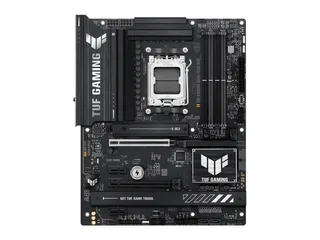
ASUS TUF GAMING B850-PLUS WIFI
PCIe 5.0 graphics slot, Wi-Fi 7 and three M.2 slots on AM5.
 Best budget AM5Check price
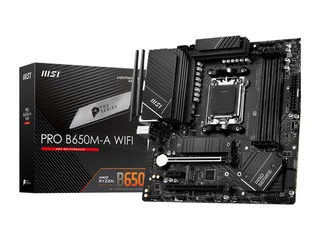
MSI PRO B650M-A WIFI
A dependable micro-ATX AM5 board with Wi-Fi 6E and two Gen4 M.2 slots.
 Best IntelCheck price
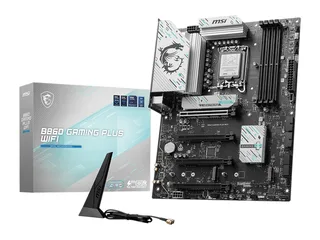
MSI B860 GAMING PLUS WIFI
PCIe 5.0 slot, Thunderbolt 4 and Wi-Fi 7 for Core Ultra processors.
 Best DDR4 boardCheck price
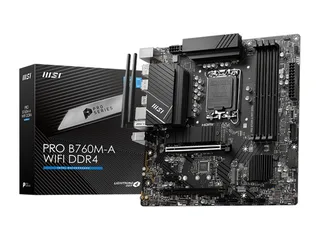
MSI PRO B760M-A WIFI DDR4
Reuse DDR4 memory with an Intel 12th to 14th Gen chip and a PCIe 4.0 slot.
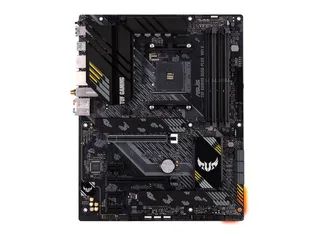 Best AM4Check price
ASUS TUF GAMING B550-PLUS WIFI II
Gives AM4 upgraders a PCIe 4.0 slot, Wi-Fi 6 and BIOS FlashBack.
Best motherboards for the RTX 5060 compared
The GPU slot column matters most: a PCIe 5.0 slot gives the RTX 5060 its full link, while PCIe 4.0 halves it, which only shows when a game overflows the card's 8GB of memory.
| Motherboard | Best for | Socket / chipset | GPU slot | M.2 slots | Memory | Networking |
|---|---|---|---|---|---|---|
 |
Overall | AM5 / B850 | PCIe 5.0 | 3 | DDR5 | Wi-Fi 7, 2.5GbE |
 |
Budget AM5 | AM5 / B650 | PCIe 4.0 | 2 | DDR5 | Wi-Fi 6E, 2.5GbE |
 |
Intel | LGA1851 / B860 | PCIe 5.0 | 3 | DDR5 | Wi-Fi 7, 5GbE |
 |
DDR4 builds | LGA1700 / B760 | PCIe 4.0 | 2 | DDR4 | Wi-Fi 6E, 2.5GbE |
 |
AM4 | AM4 / B550 | PCIe 4.0 | 2 | DDR4 | Wi-Fi 6, 2.5GbE |
The 5 best motherboards for the RTX 5060 reviewed
Ranked by how well each board suits an RTX 5060 build: the graphics slot it offers, the features you get and how much of the budget it leaves for everything else.
1ASUS TUF GAMING B850-PLUS WIFIBest motherboard for RTX 5060 overall
PCIe 5.0 graphics slot, Wi-Fi 7 and three M.2 slots on AM5.

Our score
- Graphics slot
9.6 9.6- Features
9 9- Value
8.5 8.5
Best for: New AM5 builds that want the RTX 5060's full PCIe 5.0 link and a board that will handle faster Ryzen chips and graphics cards later.
ASUS's TUF GAMING B850-PLUS WIFI is the best motherboard for the RTX 5060 because it gives the card everything it can use. Its top slot is PCIe 5.0 x16, so the RTX 5060's eight lanes run at full speed, which matters most when a game spills past the card's 8GB of video memory. The slot is reinforced and has ASUS's Q-Release lever, which unlatches the card without reaching behind it. Around it you get three M.2 slots, one PCIe 5.0 and two PCIe 4.0, four DDR5 slots rated for 8000+ MT/s with overclocking, a 14+2+1 power design with 80A stages that handles any AM5 processor, Wi-Fi 7 and 2.5Gb Ethernet. There's a BIOS FlashBack button for updating without a processor, a 20Gbps USB-C port on the back and a header for a USB4 add-in card.
Some users reported problems with the graphics slot that ASUS support had to sort out, while most say the board booted straight away and the BIOS is easy to find your way around. After reports of failed Ryzen chips on some AM5 boards in 2025, ASUS advised owners of its 800-series boards to keep their BIOS up to date, so install the latest version before you game. Like every AM5 board, the first boot with new memory takes a while as it trains. It costs more than a B650 board, but it's the one we'd choose to get the most out of an RTX 5060 and to carry into a future upgrade.
Reasons to buy
- PCIe 5.0 slot gives the RTX 5060 its full link
- Wi-Fi 7 and three M.2 slots
- BIOS FlashBack and a slot release lever
Reasons to avoid
- Costs more than B650 boards
- DDR5 only
- Only one rear USB-C port
Specifications
- Socket / chipset
- AM5 / AMD B850, ATX
- Graphics slot
- PCIe 5.0 x16 with Q-Release
- M.2 slots
- 3 (1x PCIe 5.0 x4, 2x PCIe 4.0 x4)
- Memory
- 4x DDR5, up to 8000+ MT/s (OC)
- Power stages
- 14+2+1, 80A
- Networking
- Wi-Fi 7, 2.5Gb Ethernet
Buy it if...
- You're building a new AM5 gaming PC It gives the RTX 5060 a PCIe 5.0 slot and has room to grow with a faster Ryzen chip and graphics card.
- You want strong Wi-Fi and plenty of storage Wi-Fi 7 and three M.2 slots, one of them PCIe 5.0, cover most builds without add-in cards.
Don't buy it if...
- You're on a tight budget The MSI PRO B650M-A WIFI costs less and still gives the RTX 5060 a PCIe 4.0 slot.
- You want to keep your DDR4 memory The MSI PRO B760M-A WIFI DDR4 or ASUS TUF GAMING B550-PLUS WIFI II take DDR4.
Bottom line: The motherboard we'd build an RTX 5060 PC on: a PCIe 5.0 slot for the card's full link, modern Wi-Fi and storage, and room to upgrade.
2MSI PRO B650M-A WIFIBest budget AM5 motherboard for RTX 5060
A dependable micro-ATX AM5 board with Wi-Fi 6E and two Gen4 M.2 slots.

Our score
- Graphics slot
8.2 8.2- Features
8.2 8.2- Value
9.4 9.4
Best for: Budget AM5 builds with a Ryzen 5 7500F or 7500X3D and an RTX 5060, where every dollar saved goes to the graphics card or memory.
MSI's PRO B650M-A WIFI is the budget AM5 board we'd put under an RTX 5060. It's a micro-ATX board with an 8+2+1 power design, four DDR5 slots rated up to 7200+ MT/s with overclocking and 256GB in total, two PCIe 4.0 x4 M.2 slots with a heatsink, Wi-Fi 6E with Bluetooth 5.3 and 2.5Gb Ethernet. The top x16 slot runs at PCIe 4.0 from the processor, which gives the RTX 5060 half of its maximum link; in most games that costs little, and it only shows when a game overflows the card's 8GB of memory. MSI includes a Flash BIOS button for updating without a processor and EZ Debug LEDs that point to the part holding up a boot.
Some users reported first boots of a minute or more while the board trains new DDR5 memory, with later boots around 30 seconds; turning on Memory Context Restore in the BIOS cuts that roughly in half once the system is stable. Owners otherwise describe it as a solid, no-fuss board that works with everything from a Ryzen 5 7500F to a 9800X3D. The trade-offs against the ASUS TUF B850 are the PCIe 4.0 slot and one fewer M.2 slot, which for an RTX 5060 build is a fair exchange for the money saved.
Reasons to buy
- Low price for a full-featured AM5 board
- Wi-Fi 6E and 2.5Gb Ethernet
- Flash BIOS button and EZ Debug LEDs
Reasons to avoid
- PCIe 4.0 slot, not 5.0
- Only two M.2 slots
- Slow first boot while memory trains
Specifications
- Socket / chipset
- AM5 / AMD B650, micro-ATX
- Graphics slot
- PCIe 4.0 x16
- M.2 slots
- 2x PCIe 4.0 x4
- Memory
- 4x DDR5, up to 7200+ MT/s (OC), 256GB
- Power design
- 8+2+1 Duet Rail
- Networking
- Wi-Fi 6E, 2.5Gb Ethernet
Buy it if...
- You want AM5 on a budget It costs much less than B850 boards and keeps the upgrade path to future Ryzen chips.
- You're building in a smaller case The micro-ATX layout fits compact towers while keeping four memory slots.
Don't buy it if...
- You want the RTX 5060's full PCIe 5.0 link The ASUS TUF GAMING B850-PLUS WIFI has a PCIe 5.0 slot.
- You need lots of storage Two M.2 slots fill up fast; the ASUS TUF GAMING B850-PLUS WIFI has three.
Bottom line: The best-value AM5 board for an RTX 5060: everything a gaming PC needs, including Wi-Fi 6E and a PCIe 4.0 slot, for a budget price.
3MSI B860 GAMING PLUS WIFIBest Intel motherboard for RTX 5060
PCIe 5.0 slot, Thunderbolt 4 and Wi-Fi 7 for Core Ultra processors.

Our score
- Graphics slot
9.4 9.4- Features
9 9- Value
8 8
Best for: Intel builds with a Core Ultra 5 250K Plus or other Core Ultra (Series 2) processor and an RTX 5060.
MSI's B860 GAMING PLUS WIFI is the Intel motherboard we'd use for an RTX 5060 build with a Core Ultra processor. Its top slot is PCIe 5.0 x16, wired to the processor with MSI's reinforced Steel Armor, so the RTX 5060's eight lanes run at full speed. There are three M.2 slots, one PCIe 5.0 x4, one PCIe 4.0 x4 and one PCIe 4.0 x2, four DDR5 slots rated for 8800+ MT/s with overclocking and support for CUDIMM memory, and a 12+1+1+1 power design for the LGA1851 socket. Connections are generous for a B860 board: a Thunderbolt 4 port, Intel Killer 5Gb Ethernet, Wi-Fi 7 and a front USB-C header. MSI adds tool-free M.2 shields and a one-finger graphics card release, plus EZ Debug LEDs and a Clear CMOS button.
Some users reported memory kits that wouldn't run with their Core Ultra processor, so check MSI's memory support list before you buy, while others praise the M.2 cooling, the USB selection and the clear BIOS. The bigger question is the platform. LGA1851 isn't expected to get another processor generation, so this board is best seen as part of a complete build rather than a base for future CPU upgrades. Paired with a Core Ultra 5 250K Plus and an RTX 5060, it's an excellent, well-connected gaming and streaming PC.
Reasons to buy
- PCIe 5.0 slot for the RTX 5060's full link
- Thunderbolt 4, 5Gb LAN and Wi-Fi 7
- Tool-free M.2 and easy graphics card release
Reasons to avoid
- LGA1851 isn't expected to get new processors
- Third M.2 slot is only x2
- Fussy about some memory kits
Specifications
- Socket / chipset
- LGA1851 / Intel B860, ATX
- Graphics slot
- PCIe 5.0 x16
- M.2 slots
- 3 (PCIe 5.0 x4, 4.0 x4, 4.0 x2)
- Memory
- 4x DDR5, up to 8800+ MT/s (OC), CUDIMM
- Ports
- Thunderbolt 4, front USB-C
- Networking
- Wi-Fi 7, 5Gb Ethernet
Buy it if...
- You're building with a Core Ultra processor It gives the RTX 5060 a PCIe 5.0 slot and the Core Ultra 5 250K Plus plenty of power.
- You want fast connections Thunderbolt 4, 5Gb Ethernet and Wi-Fi 7 are rare at this price.
Don't buy it if...
- You want a CPU upgrade path AMD's AM5 boards, like the ASUS TUF GAMING B850-PLUS WIFI, have a longer future.
- You want to use DDR4 The MSI PRO B760M-A WIFI DDR4 with a Core i5-14400F does that for much less.
Bottom line: The Intel board to pair with a Core Ultra processor and an RTX 5060: a PCIe 5.0 slot and connections that usually cost much more.
4MSI PRO B760M-A WIFI DDR4Best DDR4 motherboard for RTX 5060
Reuse DDR4 memory with an Intel 12th to 14th Gen chip and a PCIe 4.0 slot.

Our score
- Graphics slot
8 8- Features
7.6 7.6- Value
9.5 9.5
Best for: Budget RTX 5060 builds with a Core i5-14400F that reuse DDR4 memory, and Intel 12th or 13th Gen owners upgrading their board.
MSI's PRO B760M-A WIFI DDR4 is the motherboard to choose for an RTX 5060 build that saves money by reusing DDR4 memory. It's a micro-ATX board for Intel's 12th, 13th and 14th Gen Core processors on the LGA1700 socket, with four DDR4 slots taking up to 128GB at speeds up to 5333 MT/s with overclocking. The top x16 slot is PCIe 4.0 from the processor, which gives the RTX 5060 half its maximum link, and there are two PCIe 4.0 x4 M.2 slots, one from the processor and one from the chipset. Networking is better than you'd expect at the price, with Wi-Fi 6E, Bluetooth 5.3 and 2.5Gb Ethernet, and the rear panel has two 10Gbps and two 5Gbps USB-A ports plus HDMI and DisplayPort outputs for processors with integrated graphics.
Owners describe it as easy to install and stable, and some users reported that the Wi-Fi only worked after installing the latest driver from MSI's support page. The missing rear USB-C port is the main gap, and like any LGA1700 board it won't take future processors. Check that you're buying the DDR4 version, since MSI sells a DDR5 model with almost the same name. With a Core i5-14400F it forms one of the cheapest capable homes for an RTX 5060.
Reasons to buy
- Takes DDR4, saving a lot while DDR5 is expensive
- Two PCIe 4.0 M.2 slots
- Wi-Fi 6E and 2.5Gb Ethernet
Reasons to avoid
- No rear USB-C port
- LGA1700 has no future CPU upgrades
- PCIe 4.0 slot, not 5.0
Specifications
- Socket / chipset
- LGA1700 / Intel B760, micro-ATX
- Graphics slot
- PCIe 4.0 x16
- M.2 slots
- 2x PCIe 4.0 x4
- Memory
- 4x DDR4, up to 128GB, 5333 MT/s (OC)
- Rear USB
- 2x 10Gbps, 2x 5Gbps, 2x USB 2.0 (all Type-A)
- Networking
- Wi-Fi 6E, 2.5Gb Ethernet
Buy it if...
- You have DDR4 memory to reuse Moving your memory over can save more than the price of this board while DDR5 prices are high.
- You're pairing it with a Core i5-14400F Together they make one of the cheapest capable platforms for an RTX 5060.
Don't buy it if...
- You want USB-C on the back The ASUS TUF GAMING B550-PLUS WIFI II has a rear USB-C port, and AM5 boards add more.
- You want to upgrade the CPU later AM5 boards such as the MSI PRO B650M-A WIFI have a longer road ahead.
Bottom line: The budget Intel board for an RTX 5060 build that keeps your DDR4: dependable, well connected and cheap.
5ASUS TUF GAMING B550-PLUS WIFI IIBest AM4 motherboard for RTX 5060
Gives AM4 upgraders a PCIe 4.0 slot, Wi-Fi 6 and BIOS FlashBack.

Our score
- Graphics slot
7.8 7.8- Features
7.8 7.8- Value
9.2 9.2
Best for: AM4 owners on an older B450 or A520 board, or with a dying board, who want to give an RTX 5060 a PCIe 4.0 slot and keep their memory.
ASUS's TUF GAMING B550-PLUS WIFI II is the AM4 board we'd pick for an RTX 5060, especially as an upgrade from an older B450 or A520 board. With a Ryzen 5000 or 3000 processor its top x16 slot runs at PCIe 4.0, double the bandwidth of B450 and A520 boards for the RTX 5060's eight lanes. Be aware that Ryzen 5000G and 4000G chips drop that slot to PCIe 3.0 on any board. It's an ATX board with 8+2 DrMOS power stages, four DDR4 slots taking up to 128GB, one PCIe 4.0 x4 M.2 slot and one PCIe 3.0 x4 M.2 slot, which shares bandwidth with two SATA ports. You get Wi-Fi 6, 2.5Gb Ethernet, a rear 10Gbps USB-C port and a BIOS FlashBack button that updates the board from a USB stick without a processor.
Some users reported faulty onboard Wi-Fi out of the box, so test it as soon as you build and return the board quickly if it doesn't connect. Others describe it as a solid board with reliable networking. AM4 has reached the end of its upgrade road, so this is a board for getting more life from a Ryzen 5000 system rather than starting fresh. Paired with a Ryzen 5 5600 and the DDR4 memory you already own, it makes an RTX 5060 upgrade very affordable.
Reasons to buy
- PCIe 4.0 slot with Ryzen 5000 and 3000 chips
- Keeps your DDR4 memory
- BIOS FlashBack button
Reasons to avoid
- AM4 has no further CPU upgrades
- Second M.2 slot is only PCIe 3.0
- PCIe 3.0 slot with G-series chips
Specifications
- Socket / chipset
- AM4 / AMD B550, ATX
- Graphics slot
- PCIe 4.0 x16 (PCIe 3.0 with Ryzen 5000G/4000G)
- M.2 slots
- 2 (1x PCIe 4.0 x4, 1x PCIe 3.0 x4)
- Memory
- 4x DDR4, up to 128GB, 4866 MT/s (OC)
- Power stages
- 8+2 DrMOS
- Networking
- Wi-Fi 6, 2.5Gb Ethernet
Buy it if...
- You're on a B450 or A520 board Moving to B550 lifts the RTX 5060's slot from PCIe 3.0 to PCIe 4.0 with a Ryzen 5000 or 3000 chip.
- You want to keep your AM4 processor and memory It takes everything from a Ryzen 5 3600 to a Ryzen 7 5800X3D with your existing DDR4.
Don't buy it if...
- You use a Ryzen 5000G or 4000G processor These chips run the slot at PCIe 3.0 on any board; pair the board with a Ryzen 5 5600 instead.
- You're building from scratch An AM5 board like the MSI PRO B650M-A WIFI has a future.
Bottom line: The AM4 board that gives an RTX 5060 the PCIe 4.0 slot it deserves, with good Wi-Fi and networking, for a budget price.
How to choose a motherboard for the RTX 5060
The RTX 5060 isn't demanding on a motherboard, but a few details make a real difference.
RTX 5060 motherboard requirements in short
You need a full-length PCIe x16 slot, room for a dual-slot card, and a board that boots in UEFI mode. The slot supplies up to 75W and the rest of the RTX 5060's 145W comes through an 8-pin power cable, so the board's own power design doesn't matter for the graphics card. Resizable BAR support, which every board here has, lets the processor access all of the card's memory at once and helps in some games.
Why the slot's PCIe generation matters
The RTX 5060 is a PCIe 5.0 x8 card. In a PCIe 5.0 slot it gets the same total bandwidth as a PCIe 4.0 x16 link, in a PCIe 4.0 slot it gets half and in a PCIe 3.0 slot a quarter. In most games the difference is a few percent at most, but when a game needs more than 8GB of video memory the card leans on that link, and slower slots lose more. Independent testing of the closely related 8GB RTX 5060 Ti found drops of up to around 10% on PCIe 4.0 in memory-heavy games and more on PCIe 3.0.
Which chipset: B850, B650, B860, B760 or B550?
On AMD's AM5 platform, B850 boards have a PCIe 5.0 graphics slot, while most B650 boards use PCIe 4.0. On Intel's LGA1851, B860 boards such as our pick have a PCIe 5.0 slot. For DDR4 builds, Intel's B760 boards pair with 12th to 14th Gen chips and AMD's B550 boards with Ryzen 5000 and 3000 chips, both with PCIe 4.0 slots. Avoid B450 and A520 boards for an RTX 5060 if you can, because their graphics slots are PCIe 3.0.
Check your processor too
The processor sets the slot speed as much as the board does. AMD's Ryzen 5000G and 4000G chips run the slot at PCIe 3.0 even on a B550 board, and the Ryzen 8500G and 8300G cut it to four lanes on AM5. Pair an RTX 5060 with a processor that gives it at least PCIe 4.0 x8; our RTX 5060 CPU guide has five that do.
DDR4 or DDR5 boards in 2026
AM5 and LGA1851 boards take DDR5 only, and DDR5 prices rose sharply through 2026. Boards that take DDR4, such as the MSI PRO B760M-A WIFI DDR4 and ASUS TUF GAMING B550-PLUS WIFI II, let you reuse memory you already own, which can save more than the price of the board. Check whether a board is the DDR4 or DDR5 version before you buy, because many models come in both.
Size, Wi-Fi and storage
Micro-ATX boards like the MSI PRO B650M-A WIFI fit smaller cases and cost less, while ATX boards add M.2 slots and expansion room. Built-in Wi-Fi saves you buying an adapter, and at least two M.2 slots give you room to add a second SSD later, which helps because modern games are large.
How to set up a new motherboard for the RTX 5060
These steps make sure the board gives the card its full link and boots without problems.
- Update the BIOS before or right after the build. ASUS's BIOS FlashBack and MSI's Flash BIOS button can do it from a USB stick without a processor installed.
- Set the board to UEFI mode with CSM off. Some RTX 5060 cards show a black screen on boot in legacy mode, and NVIDIA's GPU UEFI Firmware Update Tool fixes affected cards.
- Turn on Above 4G Decoding and Resizable BAR in the BIOS.
- Fit the RTX 5060 in the top full-length slot, which is wired to the processor, and connect its 8-pin or 12V-2x6 power cable firmly.
- Install the chipset, network and audio drivers from the board maker's support page, then the latest GeForce driver.
Tip: Lower slots on most boards run through the chipset with four lanes or fewer. An RTX 5060 in the second x16 slot can lose a lot of bandwidth, so always use the top one.
Other motherboards for the RTX 5060 we considered
-
AMD A620 motherboards
The cheapest way onto AM5, with a PCIe 4.0 graphics slot, but they have simpler power delivery, fewer M.2 slots and often no Wi-Fi. The MSI PRO B650M-A WIFI costs a little more and is a much better board.
-
B450 and A520 motherboards
Fine for older Ryzen builds, but their graphics slots are PCIe 3.0, which gives the RTX 5060 a quarter of its full link. A B550 board fixes that for little extra.
-
X870E and Z890 motherboards
Excellent boards with more USB4, M.2 and overclocking features, but they cost far more and add nothing the RTX 5060 can use.
-
Mini-ITX B850 boards
Great for tiny builds, but they cost more than ATX boards with the same chipset and have fewer M.2 slots. Pair one with a small-form-factor power supply such as the Corsair SF750.
How we chose these motherboards for the RTX 5060
We shortlisted motherboards widely sold online for the platforms that make sense with an RTX 5060: AM5 and LGA1851 for new builds, and DDR4 boards on LGA1700 and AM4 for budget builds and upgrades. We compared them on the PCIe generation of the graphics slot, M.2 storage, memory support, networking, BIOS recovery features and price. Specs come from the makers' official product and specification pages, the RTX 5060's requirements from NVIDIA, and we add the strengths and problems users report after building with each board. Subscores rate the graphics slot, features and value.
Best motherboard for RTX 5060 FAQs
What is the best motherboard for the RTX 5060?
The ASUS TUF GAMING B850-PLUS WIFI is our pick. Its PCIe 5.0 x16 slot gives the RTX 5060 its full eight-lane link, and it adds Wi-Fi 7, three M.2 slots and a sturdy 14+2+1 power design for any AM5 processor.
Does the RTX 5060 need a PCIe 5.0 motherboard?
No. It works in any PCIe x16 slot, and on PCIe 4.0 the difference is small in most games. PCIe 5.0 helps most when a game uses more than the card's 8GB of video memory, which is when the narrower link starts to matter.
Will an RTX 5060 work on a B450 or A520 motherboard?
Yes, but those boards run the graphics slot at PCIe 3.0, a quarter of the RTX 5060's full link. Expect bigger frame rate drops in memory-heavy games, and turn texture quality down a notch to keep within 8GB.
Can I use an RTX 5060 on a DDR4 motherboard?
Yes. The graphics card doesn't care about system memory type. DDR4 boards like the MSI PRO B760M-A WIFI DDR4 and ASUS TUF GAMING B550-PLUS WIFI II both give it a PCIe 4.0 slot and let you reuse memory you already have.
Do I need to update my BIOS for an RTX 5060?
It's a good idea. A current BIOS improves compatibility with RTX 50 cards, and booting in UEFI mode with CSM disabled avoids the black-screen problem some RTX 5060 cards had in legacy mode.
Should I put the RTX 5060 in the second PCIe slot?
No. On most boards only the top slot is wired to the processor at full speed, and lower slots run through the chipset with four lanes or fewer, which would cut the RTX 5060's bandwidth sharply.
Sources
Update history
- First published.


