Best Monitor for RTX 5060: 5 Screens for 1080p and 1440p Gaming (2026)
Quick answer: The ASUS TUF Gaming VG27AQ3A is the best monitor for the RTX 5060: a 27-inch 1440p, 180Hz Fast IPS screen that suits the card with DLSS turned on. The AOC 24G4X is the budget 1080p pick, the MSI MAG 272QP QD-OLED X24 is the premium OLED, the AOC Q27G3XMN brings real HDR for little money and the MSI MAG 255XF is for 300Hz esports.
We earn a commission when you buy through links on this page, at no extra cost to you. Brands can't pay to be ranked. How we review products
The RTX 5060 is a fast 1080p card that also handles 1440p well once you turn on DLSS, NVIDIA's AI upscaling, and on RTX 50 cards DLSS Multi Frame Generation can push frame rates far beyond what the card renders on its own in supported games. That makes a high refresh rate monitor the right partner, but the best resolution depends on what you play. A 1080p screen lets the card run games at high frame rates without upscaling, while a 1440p screen looks sharper but leans on DLSS and the card's 8GB of video memory. These five monitors cover both, plus a 300Hz esports screen, budget HDR and a QD-OLED, and the guide below explains how to match a monitor to the RTX 5060.
This guide is for anyone pairing a monitor with an RTX 5060, whether you're building a new PC or upgrading from an older screen. Building the rest of the PC? See our best CPU for RTX 5060, best motherboard for RTX 5060 and best PSU for RTX 5060 guides.
Best monitors for the RTX 5060 at a glance
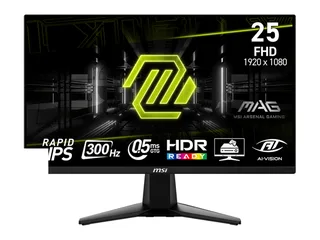 Best for esportsCheck price
MSI MAG 255XF
A 24.5-inch 1080p Rapid IPS screen at 300Hz for competitive shooters.
Best monitors for the RTX 5060 compared
Use the resolution column to match the monitor to how you play: 1080p for the highest frame rates, 1440p for sharper pictures with DLSS.
| Monitor | Best for | Size / panel | Resolution | Refresh rate | HDR | Ports |
|---|---|---|---|---|---|---|
 |
Overall | 27" Fast IPS | 1440p | 180Hz | HDR10 | DP 1.4, 2x HDMI 2.0 |
 |
Budget | 24" Fast IPS | 1080p | 180Hz | HDR10 | DP, 2x HDMI |
 |
OLED | 26.5" QD-OLED | 1440p | 240Hz | HDR (400 nits) | 2x HDMI 2.1, DP, USB-C |
 |
HDR | 27" VA mini-LED | 1440p | 180Hz | DisplayHDR 1000 | DP 1.4, HDMI 2.0 |
 |
Esports | 24.5" Rapid IPS | 1080p | 300Hz | HDR Ready | DP 1.4a, 2x HDMI 2.0b |
The 5 best monitors for the RTX 5060 reviewed
Ranked by how well each monitor suits the RTX 5060's strengths at 1080p and 1440p, for the money.
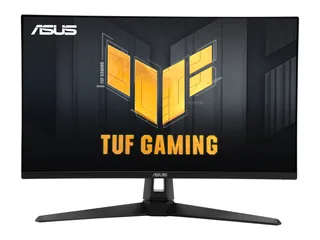
1ASUS TUF Gaming VG27AQ3ABest monitor for RTX 5060 overall
27-inch 1440p Fast IPS at 180Hz for a budget-friendly price.

Our score
- Picture quality
8.6 8.6- Gaming speed
8.9 8.9- Value
9.4 9.4
Best for: Most RTX 5060 owners who want a sharper picture than 1080p and are happy to use DLSS in demanding games.
ASUS's TUF Gaming VG27AQ3A is the monitor we'd pair with an RTX 5060. It's a 27-inch Fast IPS panel with a 2560 x 1440 resolution and a 180Hz refresh rate over DisplayPort, a 1ms GtG response time and ASUS's ELMB Sync, which combines backlight strobing with variable refresh for clearer motion. It's G-SYNC Compatible, so the RTX 5060 keeps it tear-free when frame rates dip below 180fps, and it covers 130% of the sRGB color space for vivid colors. At 1440p the RTX 5060 runs many games well with DLSS turned on, and the sharper picture is a clear step up from 1080p at this size. Connections are one DisplayPort 1.4 and two HDMI 2.0 ports, which run at up to 144Hz, and there are 2W speakers and a headphone jack.
Some users reported that turning on ELMB makes the screen noticeably dimmer, so most will leave it off outside fast shooters, and as with most IPS monitors, some glow is visible in dark scenes. The stand tilts and swivels but doesn't adjust for height, and its HDR10 support is basic at a typical 250 nits, so treat it as an SDR monitor. For the money, it's the best match for what the RTX 5060 does well.
Reasons to buy
- Sharp 1440p at 180Hz for a low price
- Wide 130% sRGB color
- ELMB Sync for clearer motion
Reasons to avoid
- Stand has no height adjustment
- HDR10 support is basic at 250 nits
- ELMB dims the screen a lot
Specifications
- Screen
- 27-inch Fast IPS
- Resolution
- 2560 x 1440 (QHD)
- Refresh rate
- 180Hz (DisplayPort), 144Hz (HDMI)
- Response / sync
- 1ms GtG, ELMB Sync, G-SYNC Compatible
- Color / HDR
- 130% sRGB, HDR10
- Ports
- 1x DisplayPort 1.4, 2x HDMI 2.0
Buy it if...
- You want 1440p without overspending It costs little more than good 1080p screens and looks much sharper at 27 inches.
- You play a mix of games 180Hz suits fast shooters, and the RTX 5060 runs story games well at 1440p with DLSS.
Don't buy it if...
- You play mostly esports at very high frame rates The MSI MAG 255XF's 300Hz panel suits that better.
- You want proper HDR The AOC Q27G3XMN's mini-LED backlight and DisplayHDR 1000 are in another league.
Bottom line: The best all-round match for an RTX 5060: a sharp, fast 1440p screen that doesn't eat into the rest of your budget.
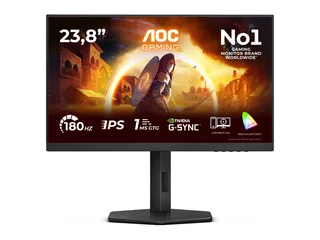
2AOC 24G4XBest budget monitor for RTX 5060
A 24-inch 1080p Fast IPS screen at 180Hz with a height-adjustable stand.

Our score
- Picture quality
8 8- Gaming speed
8.8 8.8- Value
9.6 9.6
Best for: Budget RTX 5060 builds and players who want the highest frame rates at high settings without relying on upscaling.
AOC's 24G4X is the budget monitor we'd pair with an RTX 5060. It's a 23.8-inch Fast IPS screen with a 1920 x 1080 resolution, a 180Hz refresh rate, a 1ms GtG response time and 0.5ms MPRT with backlight strobing, plus Adaptive-Sync and G-SYNC Compatible certification. At 1080p the RTX 5060 can run most games at high settings and high frame rates without upscaling, which is where this card is most comfortable, and 180Hz gives fast games a smooth, responsive feel. Unusually for the price, the stand adjusts by 130mm in height, and AOC's G4 series includes 2W speakers and HDR10 support. Both its HDMI and DisplayPort inputs reach the full 180Hz, according to independent testing.
Some users reported a little backlight bleed in the corners, and the on-screen menu uses a row of buttons rather than a joystick, which makes changing settings fiddly. Backlight strobing also only works with variable refresh turned off, a common limit on budget screens. The 1080p resolution looks softer than 1440p at this size, but for a budget RTX 5060 build that wants high frame rates without leaning on DLSS, it's excellent value.
Reasons to buy
- Very low price for 180Hz Fast IPS
- Height-adjustable stand
- Lets the RTX 5060 run games at high settings natively
Reasons to avoid
- 1080p looks soft next to 1440p
- Menu uses buttons, not a joystick
- Backlight strobing turns off variable refresh
Specifications
- Screen
- 23.8-inch Fast IPS
- Resolution
- 1920 x 1080 (FHD)
- Refresh rate
- 180Hz
- Response / sync
- 1ms GtG, 0.5ms MPRT, G-SYNC Compatible
- HDR
- HDR10
- Stand
- 130mm height adjustment
Buy it if...
- You're building on a tight budget It costs far less than 1440p screens and lets the RTX 5060 run at high frame rates without DLSS.
- You want an adjustable stand 130mm of height adjustment is rare at this price.
Don't buy it if...
- You want a sharper picture The ASUS TUF Gaming VG27AQ3A's 1440p resolution looks much crisper.
- You play esports competitively The MSI MAG 255XF runs at 300Hz.
Bottom line: The budget monitor to pair with an RTX 5060: fast, adjustable and cheap, and at 1080p the card can run nearly everything at high settings.
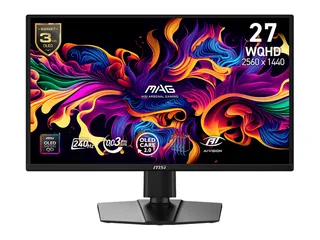
3MSI MAG 272QP QD-OLED X24Best OLED monitor for RTX 5060
1440p 240Hz QD-OLED with a three-year burn-in warranty.

Our score
- Picture quality
9.6 9.6- Gaming speed
9.3 9.3- Value
7.4 7.4
Best for: Players who want the best picture quality with their RTX 5060 and play story and adventure games at 1440p with DLSS.
MSI's MAG 272QP QD-OLED X24 is the monitor to get if picture quality matters most. It's a 26.5-inch QD-OLED panel with a 2560 x 1440 resolution, a 240Hz refresh rate and a 0.03ms GtG response time, and because every pixel lights itself, blacks are truly black and contrast is effectively infinite. Colors cover 99% of DCI-P3, MSI rates HDR brightness at 400 nits typical, and the panel is VESA ClearMR 13000 certified for motion clarity. It's G-SYNC Compatible and FreeSync Premium, with two HDMI 2.1 ports, DisplayPort 1.4a and a USB-C input with 15W charging, plus a stand that adjusts for height, tilt, swivel and pivot. MSI's OLED Care 2.0 features reduce the risk of burn-in, and the three-year warranty covers it if it happens.
Independent reviewers noted slight color fringing on text, caused by the QD-OLED panel's subpixel layout, which matters more for office work than gaming. Some users reported exceptional picture quality and a big jump in smoothness on MSI's closely related 1440p QD-OLED models. SDR brightness of 200 nits suits dim rooms better than bright ones, and it costs several times as much as our top pick. With an RTX 5060 running DLSS and frame generation at 1440p, though, it's a spectacular screen.
Reasons to buy
- Perfect blacks and vivid QD-OLED color
- Near-instant 0.03ms response
- Burn-in covered for three years
Reasons to avoid
- Costs much more than LCD picks
- Text shows color fringing up close
- 200-nit SDR brightness suits darker rooms
Specifications
- Screen
- 26.5-inch QD-OLED
- Resolution
- 2560 x 1440 (WQHD)
- Refresh rate
- 240Hz, 0.03ms GtG
- Color / brightness
- 99% DCI-P3, 400 nits HDR (typical)
- Ports
- 2x HDMI 2.1, DP 1.4a, USB-C (DP Alt, 15W)
- Warranty
- 3 years, including burn-in
Buy it if...
- You want the best picture Per-pixel lighting gives perfect blacks and contrast no LCD here can match.
- You use frame generation 240Hz and near-instant response show off DLSS Multi Frame Generation's extra frames.
Don't buy it if...
- You're on a tight budget The ASUS TUF Gaming VG27AQ3A costs a fraction as much at the same resolution.
- You work with lots of text QD-OLED subpixels cause slight color fringing on text; an IPS screen is crisper.
Bottom line: The premium screen for an RTX 5060: stunning QD-OLED picture quality and 240Hz speed, with burn-in covered by the warranty.
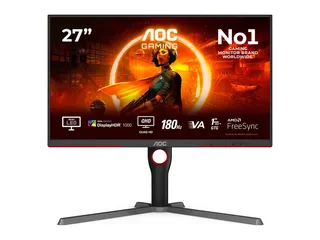
4AOC Q27G3XMNBest HDR monitor for RTX 5060
27-inch 1440p mini-LED with real DisplayHDR 1000 at a budget price.

Our score
- Picture quality
9 9- Gaming speed
8.4 8.4- Value
9 9
Best for: RTX 5060 owners who want HDR that really looks like HDR in story and adventure games, for a budget price.
AOC's Q27G3XMN is the HDR monitor we'd pair with an RTX 5060. It combines a 27-inch 1440p VA panel with a 336-zone mini-LED backlight and VESA DisplayHDR 1000 certification, so bright highlights stand out against deep blacks in a way ordinary HDR10 monitors can't manage. The VA panel's high native contrast helps in SDR too, keeping dark scenes from turning grey. Over DisplayPort it runs at 180Hz with Adaptive-Sync, which the RTX 5060 drives tear-free, and at 1440p the card handles HDR games well with DLSS turned on.
Some users reported blooming around bright objects on dark backgrounds, which is expected with 336 zones, and found that adjusting the local dimming and HDR settings in the menu improves the picture over the defaults. There's only one HDMI port, an HDMI 2.0 port at that, and like most VA panels it can show some smearing in fast, dark scenes. For HDR at a budget price, though, nothing else here comes close.
Reasons to buy
- Genuine HDR with 336 dimming zones
- Deep VA contrast for dark games
- 1440p at 180Hz over DisplayPort
Reasons to avoid
- Some blooming around bright objects
- Only one HDMI port
- VA panels can smear in dark, fast scenes
Specifications
- Screen
- 27-inch VA, 336-zone mini-LED
- Resolution
- 2560 x 1440 (QHD)
- Refresh rate
- 180Hz, 1ms GtG
- HDR
- VESA DisplayHDR 1000
- Ports
- 1x HDMI 2.0, 1x DisplayPort 1.4
- Sync
- Adaptive-Sync
Buy it if...
- You want real HDR on a budget DisplayHDR 1000 with 336 mini-LED zones gives bright highlights and deep blacks rare at this price.
- You play dark, atmospheric games The VA panel's high native contrast keeps night scenes from looking grey.
Don't buy it if...
- You play fast esports IPS screens like the AOC 24G4X and MSI MAG 255XF have cleaner motion.
- You want perfect blacks without blooming The MSI MAG 272QP QD-OLED X24 lights every pixel separately.
Bottom line: The cheapest way to see proper HDR with an RTX 5060, at a sharp 1440p and 180Hz.
5MSI MAG 255XFBest esports monitor for RTX 5060
A 24.5-inch 1080p Rapid IPS screen at 300Hz for competitive shooters.

Our score
- Picture quality
7.8 7.8- Gaming speed
9.5 9.5- Value
9 9
Best for: Competitive players in Valorant, Counter-Strike 2, Fortnite and other esports games, where the RTX 5060 can run at very high frame rates.
MSI's MAG 255XF is the monitor for RTX 5060 owners who live in competitive shooters. It's a 24.5-inch 1080p Rapid IPS panel with a 300Hz refresh rate over DisplayPort, a 0.5ms GtG response time and FreeSync Premium across 48 to 300Hz, and NVIDIA lets you turn on G-SYNC with FreeSync monitors like this one. In esports games at competitive settings the RTX 5060 can run at very high frame rates, and a 300Hz screen lets you see those frames as clearer, smoother motion. Colors cover 120% of sRGB with 8-bit plus FRC processing, and there's one DisplayPort 1.4a and two HDMI 2.0b ports, which top out at 240Hz.
Some users reported it's a huge step up from 144 and 165Hz screens and great value for a 300Hz monitor, while one reported a stuck pixel, so check the panel when it arrives. The stand only tilts, brightness is a modest 250 nits and HDR support is basic, so it's a tool for fast games rather than an all-rounder. It has a 100 x 100mm VESA mount, so a monitor arm solves the stand problem if you need height adjustment.
Reasons to buy
- 300Hz for very high frame rates
- Fast 0.5ms Rapid IPS panel
- Low price for 300Hz
Reasons to avoid
- Stand only tilts
- 1080p looks soft for non-competitive games
- 250-nit brightness and basic HDR
Specifications
- Screen
- 24.5-inch Rapid IPS
- Resolution
- 1920 x 1080 (FHD)
- Refresh rate
- 300Hz (DisplayPort), 240Hz (HDMI)
- Response / sync
- 0.5ms GtG, FreeSync Premium
- Color
- 120% sRGB, 8-bit + FRC
- Ports
- 1x DisplayPort 1.4a, 2x HDMI 2.0b
Buy it if...
- You play competitive shooters At 1080p with competitive settings the RTX 5060 reaches very high frame rates in many esports games, and 300Hz shows them.
- You want speed for little money 300Hz Rapid IPS usually costs much more.
Don't buy it if...
- You mostly play story games The ASUS TUF Gaming VG27AQ3A's 1440p screen looks much sharper.
- You need an adjustable stand The AOC 24G4X adjusts for height; this stand only tilts.
Bottom line: The RTX 5060 esports monitor: 300Hz Rapid IPS speed for competitive shooters at a budget price.
How to choose a monitor for the RTX 5060
What the RTX 5060 can drive, and how to pick the resolution, refresh rate and panel to match.
RTX 5060 display outputs and requirements
The RTX 5060 has three DisplayPort 2.1b outputs and one HDMI 2.1b output, and NVIDIA says it can drive up to four monitors, at up to 4K at 480Hz or 8K at 165Hz with Display Stream Compression. In practice any modern gaming monitor works with it. Connect over DisplayPort where you can, because many monitors are limited to a lower refresh rate over HDMI 2.0, and use a G-SYNC Compatible or Adaptive-Sync screen so frame rates below the refresh rate don't cause tearing.
1080p or 1440p for the RTX 5060?
At 1080p the RTX 5060 runs most games at high settings and high frame rates without upscaling, so a 1080p, 180Hz or faster screen gets the most out of it. At 1440p it's still a capable card, but you'll lean on DLSS Super Resolution in demanding games, and with 8GB of video memory you may need to lower texture quality in the newest titles. 4K is a stretch for this card outside lighter games.
Refresh rate: 180Hz is the sweet spot
A 144 to 180Hz monitor suits most RTX 5060 owners and costs little more than a 60Hz screen. Esports games such as Valorant and Counter-Strike 2 are light enough that the RTX 5060 can often run them far above 144fps at 1080p with competitive settings, so a 240 to 300Hz esports monitor like the MSI MAG 255XF makes sense for competitive players.
DLSS Multi Frame Generation and high refresh rates
RTX 50 cards support DLSS Multi Frame Generation, which uses AI to generate several frames for every one the card renders, and NVIDIA's DLSS 4.5 update added Dynamic Multi Frame Generation, which adjusts the multiplier automatically. In supported games that can lift the frame counter far beyond what the RTX 5060 renders natively, and a high refresh rate monitor is what lets you see the extra smoothness. It works best when the game already runs at around 60fps before frame generation, because responsiveness still follows the rendered frame rate.
IPS, VA, mini-LED or OLED?
Fast IPS panels like the ASUS VG27AQ3A and AOC 24G4X give quick response times and good colors for the money, though they show some glow in dark scenes. VA panels have much deeper contrast, and with mini-LED dimming, as on the AOC Q27G3XMN, they can show real HDR. QD-OLED panels like the MSI MAG 272QP X24 have perfect blacks and near-instant response, at a higher price and with care needed to avoid burn-in.
HDR on a budget
Many cheap monitors accept HDR10 signals but can't get bright enough or dark enough to show it properly. Look for VESA DisplayHDR 600 or higher with local dimming, or an OLED, for HDR that looks noticeably better than SDR. Otherwise, leave HDR off and enjoy a good SDR picture.
How to set up a new monitor with your RTX 5060
A few settings make sure you get the refresh rate and smoothness you paid for.
- Connect the monitor to one of the RTX 5060's DisplayPort outputs with the cable that came in the box.
- In Windows, open Settings, then Display, then Advanced display, and choose the monitor's highest refresh rate.
- Turn on Adaptive-Sync or FreeSync in the monitor's menu, then enable G-SYNC in the NVIDIA Control Panel or NVIDIA app.
- Turn on NVIDIA Reflex in games that offer it to keep input lag low, especially with frame generation on.
- For HDR monitors, switch on HDR in Windows display settings and run the Windows HDR Calibration app.
Tip: Plugged the monitor into the motherboard by mistake? Your games will run on the processor's graphics or not at all. Always use the ports on the graphics card.
Other monitors for the RTX 5060 we considered
-
4K gaming monitors
They look superb on the desktop, but the RTX 5060 needs aggressive DLSS and lower texture settings to run demanding games at 4K. A 1440p screen is the better match.
-
ASUS TUF Gaming VG27AQL3A
A close sibling of our top pick with DisplayHDR 400, but DisplayHDR 400 without local dimming adds little over SDR, so we'd save the difference.
-
1440p 240Hz Fast IPS monitors
Great for fast games, but the RTX 5060 rarely reaches 240fps at 1440p in new games without frame generation, so the 180Hz VG27AQ3A is better value.
-
Ultrawide monitors
Immersive for racing and adventure games, but a 3440 x 1440 resolution asks around a third more of the graphics card than 1440p, which pushes the RTX 5060 and its 8GB of memory hard.
How we chose these monitors for the RTX 5060
We shortlisted gaming monitors widely sold online that suit the RTX 5060's strengths, and compared them on resolution, refresh rate, panel type, motion clarity, HDR capability, ports and stand. Specs come from the makers' official product and specification pages, and the RTX 5060's display outputs and features from NVIDIA. We weigh independent test results for response times and brightness, and we add the strengths and problems users report after living with each screen. We don't publish invented frame rates. Subscores rate picture quality, gaming speed and value.
Best monitor for RTX 5060 FAQs
What is the best monitor for the RTX 5060?
The ASUS TUF Gaming VG27AQ3A is our pick. It's a 27-inch 1440p Fast IPS monitor running at 180Hz, which suits the RTX 5060 with DLSS turned on, and it's G-SYNC Compatible for tear-free play.
Is the RTX 5060 good for 1440p?
Yes, with DLSS. It runs many games well at 1440p, especially with DLSS Super Resolution, but its 8GB of video memory means you may need to lower texture quality in the newest, most demanding games.
Can the RTX 5060 run a 4K monitor?
It can output 4K and run lighter games at 4K with DLSS, but demanding new games will need heavy upscaling and reduced settings. For gaming, a 1080p or 1440p monitor is the better match.
What refresh rate monitor should I get for the RTX 5060?
A 144 to 180Hz monitor suits most players. Competitive esports players will get more from a 240 to 300Hz 1080p screen, because the RTX 5060 can run those games at very high frame rates.
Do I need a G-SYNC monitor for the RTX 5060?
No. G-SYNC Compatible and Adaptive-Sync monitors, which includes every pick here, give tear-free gaming with the RTX 5060. Monitors with a dedicated G-SYNC module cost more and aren't necessary.
Should I use HDMI or DisplayPort with the RTX 5060?
Use DisplayPort where you can. Many monitors limit HDMI 2.0 to a lower refresh rate than DisplayPort; the ASUS VG27AQ3A, for example, runs at 180Hz over DisplayPort but 144Hz over HDMI.
Sources
Update history
- First published.


