Best CPU for RTX 5070: 5 Processors for High Refresh 1440p Gaming (2026)
Quick answer: The AMD Ryzen 7 9800X3D is the best CPU for the RTX 5070: its 96MB of 3D V-Cache keeps frame rates and 1% lows high at 1440p, even with DLSS pushing the frame rate up. The Ryzen 7 7700X3D gets most of that speed for much less, the Core Ultra 7 270K Plus is the Intel pick for gaming and streaming, the Ryzen 5 9600X is the budget choice and the Ryzen 7 5800X3D 10th Anniversary Edition is the upgrade for AM4 PCs.
We earn a commission when you buy through links on this page, at no extra cost to you. Brands can't pay to be ranked. How we review products
The GeForce RTX 5070 is a 1440p graphics card with 12GB of fast GDDR7 memory, and it's quick enough that the processor starts to matter. At native 1440p the card is usually the limit, but turn on DLSS, which renders each frame at a lower resolution and upscales it, or play on a 180Hz to 300Hz monitor, and the CPU decides how high your frame rate can go and how steady it stays. The good news is that the RTX 5070 is easier to fit into an older PC than NVIDIA's cheaper cards: it uses a full 16-lane PCIe 5.0 link, so a PCIe 4.0 board costs it almost nothing. These five processors cover new AM5 and Intel builds and a drop-in AM4 upgrade, and the guide below explains the RTX 5070's CPU and platform requirements in plain terms.
This guide is for anyone building a PC around the RTX 5070 or adding one to an existing system. Once you've chosen a processor, match it with a board from our best motherboard for RTX 5070 guide, size your power supply with our best PSU for RTX 5070 guide, and pick a screen from our best monitor for RTX 5070 picks.
Best CPUs for the RTX 5070 at a glance
 Best IntelCheck price
Intel Core Ultra 7 270K Plus
24 cores for gaming, streaming and creative work on one chip.
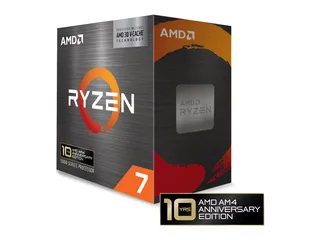 Best AM4 upgradeCheck price
AMD Ryzen 7 5800X3D 10th Anniversary Edition
Drop-in 3D V-Cache for AM4 PCs that keeps your DDR4 memory.
Best CPUs for the RTX 5070 compared
All five keep an RTX 5070 busy at 1440p. The biggest differences are cache size, which lifts frame rates and 1% lows, and the platform each chip sits on.
| Processor | Best for | Cores / threads | Max boost | Cache | TDP | Socket / memory |
|---|---|---|---|---|---|---|
 |
Overall | 8 / 16 | 5.2GHz | 96MB L3 | 120W | AM5 / DDR5 |
 |
Value | 8 / 16 | 4.5GHz | 96MB L3 | 120W | AM5 / DDR5 |
 |
Intel | 24 / 24 | 5.5GHz | 36MB | 125W | LGA1851 / DDR5 |
 |
Budget | 6 / 12 | 5.4GHz | 32MB L3 | 65W | AM5 / DDR5 |
 |
AM4 upgrade | 8 / 16 | 4.5GHz | 96MB L3 | 105W | AM4 / DDR4 |
The 5 best CPUs for the RTX 5070 reviewed
Ranked by how well each processor keeps an RTX 5070 fed at 1440p and 1080p high refresh rates for the money, counting the cost of the board and memory it needs.
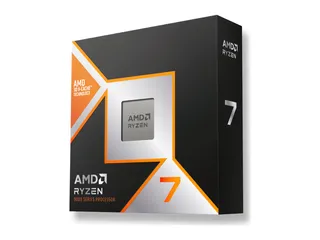
1AMD Ryzen 7 9800X3DBest CPU for RTX 5070 overall
8 Zen 5 cores and 96MB of 3D V-Cache for the highest frame rates.

Our score
- Gaming speed
9.8 9.8- Platform
9.2 9.2- Value
8.3 8.3
Best for: Gamers who want the highest and steadiest frame rates from an RTX 5070 at 1440p, especially on a 240Hz or faster monitor.
AMD's Ryzen 7 9800X3D is the best CPU for an RTX 5070 because it gives the card the most room to run. It pairs eight Zen 5 cores and 16 threads, boosting to 5.2GHz, with 96MB of L3 cache, 64MB of it in AMD's second-generation 3D V-Cache, which now sits under the cores rather than on top so they stay cooler and clock higher. That cache is what keeps frame rates and 1% lows high in busy games, and it matters most when DLSS or a high refresh monitor pushes the frame rate up and the processor becomes the limit. It's rated at 120W, sits on AMD's AM5 socket with DDR5 memory and a PCIe 5.0 graphics slot, and it's fully unlocked. AMD has also committed to supporting AM5 through 2029, so the platform will take faster chips later. Its successor, the Ryzen 7 9850X3D, is only a few percent faster.
Some users reported temperatures reaching 95°C under all-core loads until a BIOS update brought them down; in games it runs much cooler. Reports of failed 9800X3D chips in 2025, most on ASRock boards, led to BIOS updates from ASRock and AMD, so install the latest BIOS before you build. The 9800X3D costs a lot more than the 7700X3D, and at native 1440p in demanding games the gap between them is small, but for high refresh gaming and DLSS it's the chip that lets an RTX 5070 run at its best.
Reasons to buy
- Fastest gaming CPU in this guide
- Keeps 1% lows high with DLSS on
- AM5 platform with a PCIe 5.0 graphics slot
Reasons to avoid
- Costs far more than the 7700X3D
- Runs hot under all-core loads
- No cooler in the box
Specifications
- Cores / threads
- 8 / 16
- Base / max boost
- 4.7GHz / up to 5.2GHz
- L3 cache
- 96MB with 2nd-gen 3D V-Cache
- Default TDP
- 120W
- Socket / memory
- AM5 / DDR5
- Overclocking
- Unlocked, PBO and Curve Optimizer
Buy it if...
- You play on a high refresh monitor It holds frame rates up where cheaper chips run out of speed, so the RTX 5070 can feed a 240Hz or 280Hz screen.
- You use DLSS in most games Upscaling moves more of the load onto the processor, and this is the chip that copes best.
Don't buy it if...
- You want the most value for the money The AMD Ryzen 7 7700X3D has the same cache and core count for much less.
- You stream and edit as much as you play The Intel Core Ultra 7 270K Plus has 24 cores for multi-threaded work.
Bottom line: The processor that gets the most out of an RTX 5070: the fastest gaming CPU here, on a platform AMD will support for years.
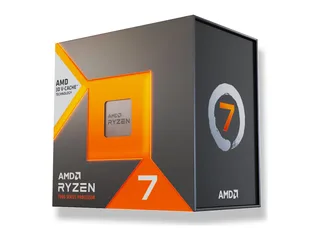
2AMD Ryzen 7 7700X3DBest value CPU for RTX 5070
8 cores and 96MB of 3D V-Cache on AM5 for far less than the 9800X3D.

Our score
- Gaming speed
9.2 9.2- Platform
9 9- Value
9.2 9.2
Best for: RTX 5070 builders who want X3D gaming performance and a modern AM5 platform without paying for the fastest chip.
AMD's Ryzen 7 7700X3D is the value pick for an RTX 5070, and for many builds it's all the processor you need. Launched in July 2026 at $329, it takes the formula of the popular Ryzen 7 7800X3D, eight Zen 4 cores with 96MB of L3 cache including 64MB of 3D V-Cache, and runs it at lower clocks: 4.0GHz base and 4.5GHz boost instead of 4.2GHz and 5.0GHz. Because the cache does most of the work in games, it gives up surprisingly little, and independent reviews found it delivered more frames per second than Intel's Core Ultra 7 270K Plus at a similar price while running cool and efficiently. It's rated at 120W on the AM5 socket, takes DDR5 memory and gives the RTX 5070 a PCIe 5.0 slot on B850 and X870 boards.
Some users reported in discussions of the first reviews that its savings make the most sense when the graphics card is the limit, as it usually is with an RTX 5070 at 1440p, while CPU-heavy games show more of a gap to the 9800X3D. Reviewers also noted that the faster Ryzen 7 7800X3D has at times sold for about the same price, so compare the two before you buy; when the 7800X3D costs more, the 7700X3D is the better value. In testing it drew far less power than the non-X3D Ryzen 7 7700X under all-core loads, and its eight cores trail Intel's 24 in heavy multi-threaded work. For an RTX 5070 gaming PC at 1440p, though, it delivers X3D smoothness for far less than the flagship.
Reasons to buy
- X3D gaming speed for much less money
- Same 96MB cache as the 7800X3D
- Runs cool and efficiently in games
Reasons to avoid
- Lower clocks than the 7800X3D
- Slower than Intel in multi-threaded work
- No cooler in the box
Specifications
- Cores / threads
- 8 / 16
- Base / max boost
- 4.0GHz / up to 4.5GHz
- L3 cache
- 96MB with 3D V-Cache
- Default TDP
- 120W
- Socket / memory
- AM5 / DDR5
- Architecture
- Zen 4, launched July 2026
Buy it if...
- You want X3D speed on a budget Its 96MB cache delivers most of the 9800X3D's benefit in games, and it leaves money for a better monitor.
- You're moving to AM5 from an older PC It gives the RTX 5070 a PCIe 5.0 slot on B850 and X870 boards and a path to faster Ryzen chips later.
Don't buy it if...
- You find a Ryzen 7 7800X3D for the same price It has the same cache with higher clocks, so it's a little faster.
- You render, encode or compile a lot The Intel Core Ultra 7 270K Plus is far quicker in multi-threaded apps.
Bottom line: The smart buy for most RTX 5070 builds: AMD's 3D V-Cache gaming speed on AM5, at a price that leaves room in the budget.
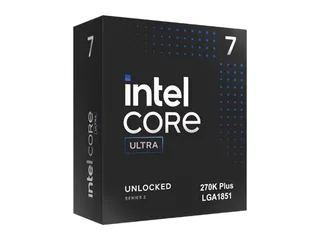
3Intel Core Ultra 7 270K PlusBest Intel CPU for RTX 5070
24 cores for gaming, streaming and creative work on one chip.

Our score
- Gaming speed
8.7 8.7- Platform
7.6 7.6- Value
9.1 9.1
Best for: RTX 5070 owners who stream, record or edit as much as they game and want one chip that does all of it well.
Intel's Core Ultra 7 270K Plus is the processor to pair with an RTX 5070 if your PC does more than play games. It has eight Performance-cores and 16 Efficient-cores, 24 threads in total, a 5.5GHz maximum turbo and 36MB of Smart Cache, with a 125W base power rating that rises to 250W under full turbo. Intel launched it at $299 as part of its Core Ultra 200S Plus refresh, with four more Efficient-cores than the Core Ultra 7 265K it replaces. Independent reviews found it a few percent faster than AMD's Ryzen 7 9700X in games and far ahead of anything near its price in multi-threaded work, though AMD's X3D chips remain quicker for pure gaming. It supports DDR5 up to 7200 MT/s and gives the RTX 5070 a PCIe 5.0 slot on Z890 and B860 boards.
Some users reported memory kits that wouldn't run at their rated speed with Core Ultra processors, so pick a kit from your board's memory support list. It draws far more power than AMD's chips under all-core loads, which calls for a strong tower or liquid cooler, and LGA1851 isn't expected to get another processor generation, so treat it as a complete build rather than a base for CPU upgrades. For gamers who stream, record or edit, it's the better buy than an X3D chip.
Reasons to buy
- 24 cores for streaming and editing
- Four more cores than the 265K it replaces
- Built-in graphics for troubleshooting
Reasons to avoid
- Slower than X3D chips in games
- LGA1851 isn't expected to get new chips
- Needs a high-end cooler for heavy loads
Specifications
- Cores / threads
- 24 (8P + 16E) / 24
- Max turbo
- Up to 5.5GHz
- Cache
- 36MB Intel Smart Cache
- Base / max turbo power
- 125W / 250W
- Socket / memory
- LGA1851 / up to DDR5-7200
- Graphics
- Intel Graphics, 4 Xe-cores
Buy it if...
- You stream or create as well as game Twenty-four cores handle encoding, recording and background apps without hurting your frame rate.
- You want integrated graphics as a backup The built-in Intel Graphics let you use the PC if the RTX 5070 ever needs to go back.
Don't buy it if...
- You only play games The AMD Ryzen 7 7700X3D is faster in games for similar money.
- You want to upgrade the CPU in a few years AM5 has a much longer road ahead than LGA1851.
Bottom line: The best Intel processor for an RTX 5070 and the strongest all-rounder here: solid gaming speed and more cores than anything near its price.
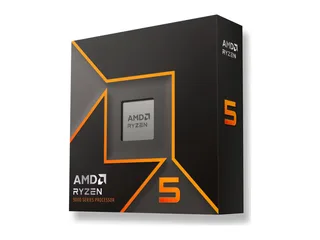
4AMD Ryzen 5 9600XBest budget CPU for RTX 5070
6 efficient Zen 5 cores that keep up with the RTX 5070 at 1440p.

Our score
- Gaming speed
8.2 8.2- Platform
9 9- Value
8.9 8.9
Best for: Budget RTX 5070 builds that game mostly at native 1440p and want a current AM5 platform to upgrade later.
AMD's Ryzen 5 9600X is the cheapest processor we'd pair with an RTX 5070. It has six Zen 5 cores and 12 threads, boosting to 5.4GHz, with 32MB of L3 cache, a 65W default TDP and AMD Radeon graphics built in. At native 1440p, where the RTX 5070 is usually the limit, it keeps the card running close to flat out in most games, and its price has fallen well below its launch level, which frees up money for the graphics card, memory or monitor. It sits on the AM5 socket with DDR5 and gives the RTX 5070 a PCIe 5.0 slot on B850 and X870 boards, and when you want more speed later you can drop in an X3D chip without changing anything else.
Some users reported trying AMD's 105W mode, which helps in multi-threaded apps but does almost nothing in games, so leave it at the default 65W. Reviewers measured a peak of 69°C, so a modest tower cooler is enough. Where it falls short is in CPU-heavy games, at 1080p and with DLSS Performance mode, when an X3D chip holds noticeably higher frame rates and 1% lows, and six cores leave less headroom for streaming. For a budget RTX 5070 build at 1440p, though, it's the right place to start.
Reasons to buy
- Low price for a current Zen 5 chip
- 65W, cool and quiet with a budget cooler
- Built-in graphics and an AM5 upgrade path
Reasons to avoid
- Falls behind X3D chips in CPU-heavy games
- Only six cores for streaming
- No cooler in the box
Specifications
- Cores / threads
- 6 / 12
- Base / max boost
- 3.9GHz / up to 5.4GHz
- L3 cache
- 32MB
- Default TDP
- 65W
- Socket / memory
- AM5 / DDR5
- Graphics
- AMD Radeon Graphics (2 cores)
Buy it if...
- You're building on a tight budget It costs a fraction of the X3D chips and keeps the RTX 5070 busy in most games at 1440p.
- You plan to upgrade the CPU later AM5 will take faster Ryzen chips, so you can drop in an X3D processor down the line.
Don't buy it if...
- You play competitive shooters at 240Hz or more The AMD Ryzen 7 7700X3D's extra cache holds much higher frame rates.
- You already own an AM4 PC with DDR4 The AMD Ryzen 7 5800X3D 10th Anniversary Edition is a cheaper way to a faster gaming chip.
Bottom line: The budget processor for an RTX 5070: fast enough for 1440p, cool and efficient, and an easy upgrade later on AM5.
5AMD Ryzen 7 5800X3D 10th Anniversary EditionBest AM4 upgrade CPU for RTX 5070
Drop-in 3D V-Cache for AM4 PCs that keeps your DDR4 memory.

Our score
- Gaming speed
8.3 8.3- Platform
7 7- Value
8.8 8.8
Best for: Owners of a B550 or X570 AM4 PC who are adding an RTX 5070 and want much better frame rates without rebuilding.
AMD's Ryzen 7 5800X3D 10th Anniversary Edition is the CPU to buy if you're dropping an RTX 5070 into an existing AM4 PC. It's the same chip as the 2022 original, eight Zen 3 cores and 16 threads boosting to 4.5GHz with 96MB of L3 cache including 64MB of 3D V-Cache, rated at 105W, and AMD brought it back in June 2026 at $349, $100 less than the original launch price, with a Carbice Ice Pad thermal pad in the box. It works with DDR4, so you keep your memory while DDR5 prices are high, and on a B550 or X570 board it gives the RTX 5070 a PCIe 4.0 x16 link, which costs the card very little. In most games it's still quicker than any non-X3D AM4 chip.
Some users reported the chip stuck at its 3.4GHz base clock on older BIOS versions, which a BIOS update fixes, so update before you swap processors. Reviewers measured low temperatures with the Carbice pad, though the pad needs some use before it reaches its best, so give it a few heat cycles before judging. It's slower than any new AM5 X3D chip and AM4 won't get anything faster, so on a B450 or A520 board, which runs the card at PCIe 3.0, a move to AM5 makes more sense. On a good B550 or X570 PC, it's the cheapest big upgrade you can make.
Reasons to buy
- Big gaming upgrade without a new board or memory
- Keeps DDR4 while DDR5 is expensive
- Gives the RTX 5070 PCIe 4.0 x16 on B550
Reasons to avoid
- Slower than new AM5 X3D chips
- AM4 is at the end of the road
- Carbice pad needs a burn-in period
Specifications
- Cores / threads
- 8 / 16
- Base / max boost
- 3.4GHz / up to 4.5GHz
- L3 cache
- 96MB with 3D V-Cache
- Default TDP
- 105W
- Socket / memory
- AM4 / DDR4
- In the box
- Carbice Ice Pad thermal pad, no cooler
Buy it if...
- You have a B550 or X570 board and DDR4 It's the fastest gaming chip AM4 can take, and it reuses everything else in your PC.
- You're upgrading from a Ryzen 5 3600 or similar The extra cores and 96MB cache transform frame rates with an RTX 5070.
Don't buy it if...
- You already have a Ryzen 7 5700X or 5800X The gain is smaller; put the money toward a new AM5 platform later.
- Your board is a B450 or A520 Those run the RTX 5070 at PCIe 3.0, so consider a B550 board or a move to AM5.
Bottom line: The upgrade that gives an AM4 PC a second life with an RTX 5070: X3D gaming speed without a new board or DDR5.
How to choose a CPU for the RTX 5070
NVIDIA doesn't publish a minimum processor for the RTX 5070, so these are the requirements that matter when you pair one.
RTX 5070 CPU requirements in short
A modern six-core processor is the realistic minimum: a Ryzen 5 7600 or 9600X, a Ryzen 7 5000-series X3D chip on AM4, or an Intel Core i5 from the 12th generation onward. Older quad-cores and first-generation Ryzen chips will run the card but leave a lot of its speed unused. For high refresh 1440p gaming, an eight-core chip with AMD's 3D V-Cache is the sweet spot. NVIDIA's only system requirement is a 650W power supply, and it bases that figure on a PC with a 16-core Ryzen 9 9950X, so every processor here fits within it.
Why the CPU matters more with DLSS
DLSS Super Resolution renders each frame at a lower resolution and upscales it, so at 1440p in Quality mode the card is really drawing well under 1440p. That lifts frame rates, and the higher the frame rate, the more work falls on the processor. In practice, many RTX 5070 owners play with DLSS on, which makes the RTX 5070 behave more like a 1080p card as far as the CPU is concerned. DLSS Multi Frame Generation on RTX 50 cards adds generated frames on the graphics card, but it multiplies the frame rate the CPU and GPU produce together, so a faster processor still gives a smoother, more responsive result.
The RTX 5070 uses a full PCIe 5.0 x16 link
Unlike the RTX 5060 and 5060 Ti, which use eight lanes, the RTX 5070 connects with all 16. In a PCIe 4.0 x16 slot it gets the same bandwidth an eight-lane card gets from PCIe 5.0, and independent tests of RTX 50 cards found only small differences between PCIe 5.0 and 4.0 x16 in games. Its 12GB of video memory also means it spills over into system memory less often than 8GB cards. PCIe 3.0 x16, found on B450 and A520 boards and with Ryzen 5000G chips, costs a few percent in some games. Avoid Ryzen 8000G processors, which cut the graphics slot to eight or four lanes.
Cores and cache
Six fast cores are enough to run the RTX 5070 well, and eight help 1% lows in busy games and leave room for streaming or Discord in the background. Cache makes the biggest difference: AMD's X3D chips stack an extra 64MB of L3 cache on the processor. In independent testing with a graphics card in the RTX 5070's class, a Ryzen 7 9800X3D was a few percent faster than a six-core Ryzen 5 7600X on average at 1440p and up to around a third faster in the most CPU-heavy games.
Memory: DDR5, DDR4 and 2026 prices
Memory prices climbed sharply through 2026, so the platform you choose affects the total cost more than it used to. A new AM5 or Intel LGA1851 build needs DDR5, and 32GB of DDR5-6000 is the sweet spot for the RTX 5070; 16GB is the minimum. AMD's AM4 socket still takes DDR4, which is why the Ryzen 7 5800X3D is worth considering if you already own a B550 or X570 board and memory.
Cooling and power
The Ryzen 5 9600X is rated at 65W and is easy to cool with a budget tower. The two newer X3D chips are rated at 120W and the 5800X3D at 105W, so give them a good dual-tower air cooler or a 240mm liquid cooler. Intel's Core Ultra 7 270K Plus is rated at 125W base and 250W maximum turbo power, which needs a high-end cooler for heavy multi-threaded work, though it draws far less in games. None of them changes the RTX 5070's power needs much, and our RTX 5070 power supply guide explains why 750W is the right size.
How to set up your CPU and RTX 5070 for the best performance
A few settings make sure the processor, memory and graphics card run as they should together.
- Update the motherboard BIOS before you install Windows. On AM5 this adds support for newer chips and the latest stability fixes, which matters for X3D processors.
- Turn on EXPO (AMD) or XMP (Intel) so your memory runs at its rated speed, and use the two slots the manual recommends for dual-channel mode.
- Enable Above 4G Decoding and Resizable BAR in the BIOS; RTX 50 cards support it and some games run faster with it on.
- Fit the RTX 5070 in the top full-length slot, which is wired to the processor, and check the manual for any M.2 slot that shares its lanes.
- Install the chipset driver from AMD or Intel and the latest GeForce driver, then turn on DLSS in demanding games.
Tip: Use a free tool such as GPU-Z to check the card's bus interface under load. It should read PCIe x16 5.0 or x16 4.0; x8 usually means an M.2 drive is sharing the slot's lanes.
Other CPUs for the RTX 5070 we considered
-
AMD Ryzen 7 9850X3D
AMD's fastest gaming chip of 2026, but only a few percent quicker than the Ryzen 7 9800X3D for noticeably more money, and the RTX 5070 rarely needs the difference.
-
AMD Ryzen 7 7800X3D
Still excellent, and worth buying when it's on sale for the same price as the Ryzen 7 7700X3D, which has the same cache and cores at lower clocks.
-
AMD Ryzen 9 9950X3D
Sixteen cores and 3D V-Cache make it a superb gaming and workstation chip, but it costs more than the RTX 5070 itself and adds nothing in games over the 9800X3D.
-
Intel Core Ultra 5 250K Plus
Delivers close to 95% of the 270K Plus's gaming speed for about a third less. It's our Intel pick for the RTX 5060 and a fine budget alternative here.
How we chose these CPUs for the RTX 5070
We shortlisted processors widely sold online and compared them on what matters with an RTX 5070: gaming speed at 1440p and 1080p high refresh rates, 1% lows, cache size, the PCIe link the platform gives the card, memory type and total platform cost. Specs come from AMD's and Intel's official product pages and the RTX 5070's requirements from NVIDIA. We read independent benchmark results, including tests with graphics cards in the RTX 5070's class, to place each chip, and we add the strengths and problems users report after living with each processor. We don't publish invented frame rates. Subscores rate gaming speed, platform and value; the overall score weighs gaming speed and value most heavily.
Best CPU for RTX 5070 FAQs
What is the best CPU for the RTX 5070?
The AMD Ryzen 7 9800X3D is our pick. Its eight Zen 5 cores and 96MB of L3 cache give the highest frame rates and steadiest 1% lows with an RTX 5070, especially with DLSS on or on a high refresh monitor, and the AM5 platform gives the card a PCIe 5.0 slot.
Will a Ryzen 5 9600X bottleneck an RTX 5070?
Only a little, and mostly in CPU-heavy games or at 1080p and with DLSS Performance mode. At native 1440p the RTX 5070 is usually the limit and the 9600X keeps up well. An X3D chip mainly improves frame rates in the busiest games and lifts 1% lows.
Is the Ryzen 7 9800X3D overkill for an RTX 5070?
Not if you play at high refresh rates or use DLSS, where the processor decides how high the frame rate can go. At native 1440p in demanding games the difference shrinks, so the Ryzen 7 7700X3D is the better value if your budget is tight.
Does the RTX 5070 work in a PCIe 4.0 or 3.0 slot?
Yes. It's backward compatible with any PCIe x16 slot. Because it uses all 16 lanes, a PCIe 4.0 x16 slot costs it very little; PCIe 3.0 x16 loses a few percent in some games.
How much RAM do I need with an RTX 5070?
32GB of dual-channel memory is the comfortable target for a new RTX 5070 gaming PC, and 16GB is the minimum. On AM5, DDR5-6000 with EXPO turned on is the sweet spot; on AM4, DDR4-3200 or 3600 works well with the 5800X3D.
What power supply do I need for an RTX 5070 and these CPUs?
NVIDIA lists a 650W power supply for the RTX 5070, based on a PC with a Ryzen 9 9950X. A quality 750W unit with a 12V-2x6 cable rated for at least 300W, or two 8-pin PCIe cables, leaves sensible headroom for any of these processors.
Sources
- NVIDIA: GeForce RTX 5070 family specifications
- AMD: Ryzen 7 9800X3D specifications
- AMD: Ryzen 7 7700X3D specifications
- Intel: Core Ultra 7 processor 270K Plus specifications
- Intel: Core Ultra 200S Plus announcement
- AMD: Ryzen 5 9600X specifications
- AMD: Ryzen 7 5800X3D specifications
- AMD: Computex 2026, 10 years of AM4 and AM5 support through 2029
Update history
- First published.


