Best Motherboard for RTX 5070: 5 Boards That Keep the Full x16 Link (2026)
Quick answer: The MSI MAG B850 TOMAHAWK MAX WIFI is the best motherboard for the RTX 5070: its PCIe 5.0 x16 slot never shares lanes with the M.2 slots, and it adds two PCIe 5.0 M.2 slots, 5G LAN and Wi-Fi 7. The Gigabyte B850 EAGLE WIFI6E is the budget AM5 pick, the Gigabyte Z890 AORUS ELITE WIFI7 PLUS is the Intel choice, the ASUS ROG STRIX B850-I GAMING WIFI is for small builds and the MSI MAG B550 TOMAHAWK MAX WIFI is for AM4 upgrades.
We earn a commission when you buy through links on this page, at no extra cost to you. Brands can't pay to be ranked. How we review products
The GeForce RTX 5070 isn't fussy about motherboards, but it does use something cheaper NVIDIA cards don't: all 16 lanes of its PCIe 5.0 graphics slot. That makes two details matter more than chipset names. The first is the generation of the slot, which sets how much bandwidth the card gets. The second is lane sharing, where some boards quietly cut the graphics slot to eight lanes when you fill a particular M.2 slot. None of the five boards here does that, and between them they cover a new AM5 build, an Intel Core Ultra build, a mini-ITX build and a drop-in upgrade for an AM4 PC. The guide below sets out the RTX 5070's motherboard requirements and how to check a board before you buy.
This guide is for anyone building or upgrading a PC around an RTX 5070. Choose the processor first with our best CPU for RTX 5070 guide, since it decides the socket, then pick a power supply from our best PSU for RTX 5070 guide and a screen from our best monitor for RTX 5070 picks.
Best motherboards for the RTX 5070 at a glance
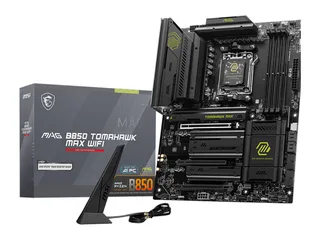 Best overallCheck price
MSI MAG B850 TOMAHAWK MAX WIFI
A PCIe 5.0 x16 slot that never shares lanes, plus two Gen5 M.2 slots.
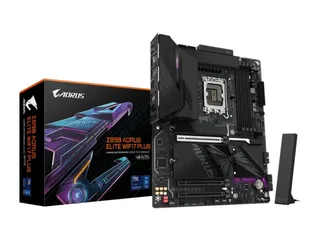 Best IntelCheck price
Gigabyte Z890 AORUS ELITE WIFI7 PLUS
A Z890 refresh board built for the Core Ultra 200S Plus chips.
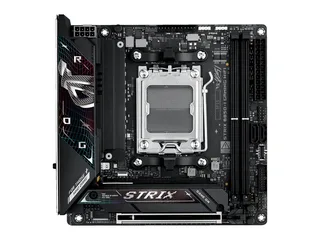 Best mini-ITXCheck price
ASUS ROG STRIX B850-I GAMING WIFI
A full PCIe 5.0 x16 slot and two Gen5 M.2 slots in a tiny board.
Best motherboards for the RTX 5070 compared
Every board here gives the RTX 5070 a full 16-lane link. They differ in slot generation, storage, size and the platform they're built for.
| Motherboard | Best for | Socket / chipset | GPU slot | M.2 slots | Memory | Networking |
|---|---|---|---|---|---|---|
 |
Overall | AM5 / B850 | PCIe 5.0 x16 | 4 (2x Gen5) | DDR5-8400+ | 5G LAN, Wi-Fi 7 |
 |
Budget | AM5 / B850 | PCIe 5.0 x16 | 3 (1x Gen5) | DDR5-8200 | 1G LAN, Wi-Fi 6E |
 |
Intel | LGA1851 / Z890 | PCIe 5.0 x16 | 4 (1x Gen5) | DDR5-9466+ | 5GbE, Wi-Fi 7 |
 |
Mini-ITX | AM5 / B850 | PCIe 5.0 x16 | 2 (2x Gen5) | DDR5-8400+ | 2.5GbE, Wi-Fi 7 |
 |
AM4 | AM4 / B550 | PCIe 4.0 x16 | 2 (1x Gen4) | DDR4-5100+ | 2.5G LAN, Wi-Fi 6E |
The 5 best motherboards for the RTX 5070 reviewed
Ranked by how well each board suits an RTX 5070 build: the graphics slot it gives the card, the features you get for the money and how well it fits the processors we recommend.
1MSI MAG B850 TOMAHAWK MAX WIFIBest motherboard for RTX 5070 overall
A PCIe 5.0 x16 slot that never shares lanes, plus two Gen5 M.2 slots.

Our score
- Graphics slot
9.8 9.8- Features
9 9- Value
8.8 8.8
Best for: New AM5 builds with a Ryzen X3D chip and an RTX 5070 that want a full PCIe 5.0 link and room for fast storage.
MSI's MAG B850 TOMAHAWK MAX WIFI is the best motherboard for an RTX 5070 because it gives the card everything it can use and avoids the catch that trips up some pricier boards. Its top slot is a PCIe 5.0 x16 slot wired to the processor, and it doesn't share lanes with any M.2 slot, so the card keeps its full link however much storage you add. You get four M.2 slots, two of them PCIe 5.0 x4 with their own lanes from the processor, plus 5G LAN, Wi-Fi 7, a 20Gbps front USB-C header and support for DDR5-8400 and beyond with overclocking. A 14+2+1 phase power design with 80A stages handles any AM5 chip, and MSI's EZ PCIe Release button unlatches the graphics card without you reaching behind it. It comes with a three-year warranty, and reviewers rate it among the best-value B850 boards.
Some users reported that it was easy to set up and has been rock solid in their AM5 builds. Like other AM5 boards, the first boot with new memory can take a few minutes while the board trains the DDR5 kit, and some AM5 owners reported much faster boots after enabling Memory Context Restore in the BIOS. It has no USB4 ports and no debug code display, and MSI's 2026 MAX WIFI II version adds a few extras for a higher price. For an RTX 5070 gaming PC, though, the original MAX WIFI has everything that matters.
Reasons to buy
- Graphics slot stays at x16 with every M.2 slot filled
- Two PCIe 5.0 M.2 slots and four in total
- 5G LAN, Wi-Fi 7 and EZ PCIe Release button
Reasons to avoid
- No USB4 ports
- No debug LED display
- First boot can take a while as memory trains
Specifications
- Socket / chipset
- AM5 / AMD B850, ATX
- Graphics slot
- PCIe 5.0 x16 from the CPU, no lane sharing
- M.2 slots
- 2x PCIe 5.0 x4, 1x PCIe 4.0 x4, 1x PCIe 4.0 x2
- Memory
- 4x DDR5, up to 256GB, DDR5-8400+ (OC)
- Networking
- Realtek 5G LAN, Wi-Fi 7, Bluetooth 5.4
- Power delivery
- 14+2+1 phases, 80A smart power stages
Buy it if...
- You want the RTX 5070's full link and fast storage Its graphics slot keeps all 16 PCIe 5.0 lanes, and both Gen5 M.2 slots have their own lanes from the processor.
- You're building with a Ryzen X3D processor It handles the Ryzen 7 9800X3D and 7700X3D with ease and has the power delivery for a 16-core chip later.
Don't buy it if...
- You're building on a tight budget The Gigabyte B850 EAGLE WIFI6E has the same PCIe 5.0 graphics slot for less.
- You need USB4 for fast external drives Look at X870 boards, and check their manuals for lane sharing.
Bottom line: The motherboard that gets an RTX 5070 build right: a full PCIe 5.0 x16 slot, fast storage and networking, at a sensible price.
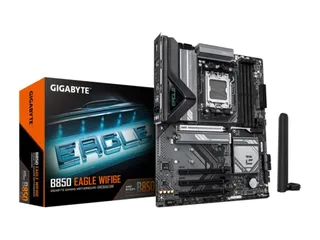
2Gigabyte B850 EAGLE WIFI6EBest budget motherboard for RTX 5070
A PCIe 5.0 x16 graphics slot on AM5 for well under $200.

Our score
- Graphics slot
9.6 9.6- Features
7.6 7.6- Value
9.2 9.2
Best for: Budget AM5 builds with a Ryzen 5 9600X or Ryzen 7 7700X3D that want the RTX 5070's full link without paying for extras.
Gigabyte's B850 EAGLE WIFI6E is the cheapest way to give an RTX 5070 its full PCIe 5.0 x16 link on AM5. Gigabyte gives it a PCIe 5.0 graphics slot, which AMD leaves optional on B850, so its top slot is the same as on boards costing much more, and Gigabyte's PCIe UD Slot design reinforces it for heavy cards. It has three M.2 slots, one PCIe 5.0 x4 and one PCIe 4.0 x4 from the processor and a PCIe 4.0 x2 slot from the chipset, none of which shares lanes with the graphics slot. Memory support runs to 256GB of DDR5 and DDR5-8200 with overclocking, and the 8+2+2 phase power design with 60A stages is fine for any processor in our RTX 5070 CPU guide. Wi-Fi 6E, a Q-Flash Plus button for BIOS updates without a processor and tool-free EZ-Latch designs make it an easy board to build with.
Some users reported that it was a great first-build board that worked without problems. The savings show elsewhere: networking is plain Gigabit Ethernet, the rear panel has a single 5Gbps USB-C port and a handful of Type-A ports, and only the main M.2 slot gets a heatsink. Gigabyte also builds it with either an Intel or a Realtek Wi-Fi 6E card depending on the board revision. None of that affects the RTX 5070, so it's the right board when you'd rather put the money into a faster processor or a better monitor.
Reasons to buy
- Full PCIe 5.0 x16 slot at a budget price
- PCIe 5.0 M.2 slot and three M.2 slots in total
- Tool-free latches for the slot and M.2 drives
Reasons to avoid
- Only Gigabit Ethernet
- Just one rear USB-C port, at 5Gbps
- Heatsink on only one M.2 slot
Specifications
- Socket / chipset
- AM5 / AMD B850, ATX
- Graphics slot
- PCIe 5.0 x16 from the CPU
- M.2 slots
- 1x PCIe 5.0 x4, 1x PCIe 4.0 x4, 1x PCIe 4.0 x2
- Memory
- 4x DDR5, up to 256GB, DDR5-8200 (OC)
- Networking
- Realtek Gigabit LAN, Wi-Fi 6E, Bluetooth 5.3
- Power delivery
- 8+2+2 phases, 60A DrMOS
Buy it if...
- You want to spend the savings on the GPU or CPU It gives the RTX 5070 the same PCIe 5.0 x16 slot as boards costing far more.
- You're building your first PC Its EZ-Latch slots, Wi-Fi EZ-Plug antenna and Q-Flash Plus button make assembly and BIOS updates simple.
Don't buy it if...
- You have fast wired internet or a NAS The MSI MAG B850 TOMAHAWK MAX WIFI has 5G LAN instead of Gigabit.
- You plan to fill several fast SSDs Only one of its M.2 slots is PCIe 5.0 and only one has a heatsink.
Bottom line: The budget board for an RTX 5070: the same full PCIe 5.0 slot as pricier B850 boards, with the extras trimmed to keep the cost down.
3Gigabyte Z890 AORUS ELITE WIFI7 PLUSBest Intel motherboard for RTX 5070
A Z890 refresh board built for the Core Ultra 200S Plus chips.

Our score
- Graphics slot
9.6 9.6- Features
8.8 8.8- Value
7.8 7.8
Best for: Intel builds with a Core Ultra 7 270K Plus and an RTX 5070, especially PCs used for streaming and creative work.
Gigabyte's Z890 AORUS ELITE WIFI7 PLUS is the Intel board we'd pair with an RTX 5070 and a Core Ultra 7 270K Plus. It's one of the Z890 refresh boards built for Intel's Core Ultra 200S Plus processors, which it supports without a BIOS update, and its top slot is a PCIe 5.0 x16 slot from the processor that doesn't share lanes with the M.2 slots. Storage is generous for the money, with one PCIe 5.0 x4 M.2 slot and three PCIe 4.0 x4 slots, and the board adds 5GbE, Wi-Fi 7 and a rear USB4 port. Its 16 x 60A power stages for the processor cores, memory support rated beyond DDR5-9466 and Gigabyte's Ultra Turbo Mode suit an unlocked chip. At $269.99, reviewers found it matched pricier Z890 boards in gaming and creative work.
Some users reported memory kits that wouldn't run at their XMP speed on Z890 boards, or wouldn't boot at all, until they updated the BIOS or swapped to a kit on the board's memory support list, so check that list before you buy. Reviewers noted it has only one rear USB-C port, a fairly small heatsink on the PCIe 5.0 M.2 slot and an older Realtek audio codec. LGA1851 also isn't expected to get another processor generation, so treat this as a complete build rather than a base for CPU upgrades. For a 270K Plus and RTX 5070 PC, it's a well-rounded board.
Reasons to buy
- Native support for Core Ultra 200S Plus chips
- Four M.2 slots and a USB4 port
- 5GbE and Wi-Fi 7 for the price
Reasons to avoid
- Only one rear USB-C port
- Small heatsink on the PCIe 5.0 M.2 slot
- LGA1851 isn't expected to get new chips
Specifications
- Socket / chipset
- LGA1851 / Intel Z890, ATX
- Graphics slot
- PCIe 5.0 x16 from the CPU, no lane sharing
- M.2 slots
- 1x PCIe 5.0 x4, 3x PCIe 4.0 x4
- Memory
- 4x DDR5, DDR5-9466+ (OC)
- Networking
- 5GbE LAN, Wi-Fi 7
- Power delivery
- 16x 60A DrMOS for the CPU cores
Buy it if...
- You've chosen the Core Ultra 7 270K Plus It supports the Plus chips out of the box and adds Gigabyte's Ultra Turbo Mode for extra speed.
- You want lots of fast storage Four M.2 slots, one of them PCIe 5.0, leave room for game libraries and recordings.
Don't buy it if...
- You're gaming on an AMD X3D chip The MSI MAG B850 TOMAHAWK MAX WIFI is cheaper and the AM5 platform has a longer future.
- You don't plan to overclock A B860 board costs less and still gives the RTX 5070 a PCIe 5.0 slot.
Bottom line: The Intel board to pair with an RTX 5070: native support for the latest Core Ultra chips, a full PCIe 5.0 slot and fast networking.
4ASUS ROG STRIX B850-I GAMING WIFIBest mini-ITX motherboard for RTX 5070
A full PCIe 5.0 x16 slot and two Gen5 M.2 slots in a tiny board.

Our score
- Graphics slot
9.6 9.6- Features
8.8 8.8- Value
6.8 6.8
Best for: Small form factor RTX 5070 builds with a Ryzen X3D chip and an SFX power supply.
ASUS's ROG STRIX B850-I GAMING WIFI is the board for an RTX 5070 in a small case. It packs AM5 and the B850 chipset into mini-ITX, with a PCIe 5.0 x16 slot wired to the processor and ASUS's Q-Release Slim button for removing the card in a cramped case. Unusually for its size, both of its M.2 slots are PCIe 5.0 x4, each with its own lanes from the processor, so filling them doesn't touch the graphics slot. The 10+2+1 power stage design, rated at 90A, handles any AM5 chip, two DDR5 slots take up to 128GB and DDR5-8400 or faster with overclocking, and it adds Wi-Fi 7, Intel 2.5GbE and a 20Gbps USB-C port. Reviewers called it pricey but worth it for builders who need dual PCIe 5.0 storage.
Some users reported the SSD in the main M.2 slot bending under the pressure of the heatsink's thermal pad, and one owner found a thinner pad helped, so seat the drive carefully. It costs more than most full-size B850 boards, and mini-ITX means only two memory slots and fewer ports. Pair it with an SFX power supply such as the Corsair SF850 and check your case's graphics card clearance. In a small RTX 5070 build, it gives up nothing that matters for gaming.
Reasons to buy
- Two PCIe 5.0 M.2 slots on mini-ITX
- Full PCIe 5.0 x16 slot with a release button
- Strong power delivery for X3D chips
Reasons to avoid
- Costs more than most ATX B850 boards
- Only two memory slots
- Tight M.2 mounting under the heatsinks
Specifications
- Socket / chipset
- AM5 / AMD B850, mini-ITX
- Graphics slot
- PCIe 5.0 x16 with Q-Release Slim
- M.2 slots
- 2x PCIe 5.0 x4
- Memory
- 2x DDR5, up to 128GB, DDR5-8400+ (OC)
- Networking
- Intel 2.5GbE, Wi-Fi 7
- Power delivery
- 10+2+1 power stages, 90A
Buy it if...
- You're building a compact gaming PC It gives the RTX 5070 the same full PCIe 5.0 x16 slot as an ATX board in a fraction of the space.
- You want fast storage in a small case Both of its M.2 slots are PCIe 5.0 x4, which few mini-ITX boards offer.
Don't buy it if...
- Your case takes a full-size board The MSI MAG B850 TOMAHAWK MAX WIFI costs less and has more slots and ports.
- You want 4 memory slots or 256GB of RAM Mini-ITX boards have two slots, so this one tops out at 128GB.
Bottom line: The mini-ITX board for a small RTX 5070 PC: a full PCIe 5.0 slot, two Gen5 M.2 slots and power for any AM5 chip.
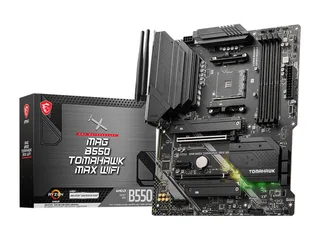
5MSI MAG B550 TOMAHAWK MAX WIFIBest AM4 motherboard for RTX 5070
A PCIe 4.0 x16 slot and DDR4 support for AM4 upgrades.

Our score
- Graphics slot
8.4 8.4- Features
7.6 7.6- Value
9 9
Best for: Owners of an AM4 PC who are adding an RTX 5070 and a Ryzen 7 5800X3D and want to keep their DDR4 memory.
MSI's MAG B550 TOMAHAWK MAX WIFI is the board to choose if you're putting an RTX 5070 into an AM4 PC and your current board is an older B450 or A520. Its top slot is PCIe 4.0 x16 from the processor, which costs the RTX 5070 very little compared with PCIe 5.0, while those older boards run it at PCIe 3.0. It supports Ryzen 5000 and 3000 processors, including the Ryzen 7 5800X3D from our RTX 5070 CPU guide, and four DDR4 slots rated up to DDR4-5100 with overclocking, so you can keep the memory you already own while DDR5 prices are high. It has one PCIe 4.0 x4 M.2 slot, one PCIe 3.0 x4 slot and six SATA ports, along with 2.5G LAN, Wi-Fi 6E, 10Gbps USB-A and USB-C ports and a Flash BIOS button for updates without a processor.
Some users reported that it was easy to install and that the built-in Wi-Fi works well, and many owners describe it as a great board for the price. Its limits are those of AM4: there are only two M.2 slots, one of them PCIe 3.0, and AMD won't release faster processors for the socket. Update to the latest BIOS before fitting a Ryzen 7 5800X3D, and avoid Ryzen 5000G chips, which drop the graphics slot to PCIe 3.0. For an AM4 upgrade, it's the cheapest way to give an RTX 5070 a proper home.
Reasons to buy
- Keeps your DDR4 memory while DDR5 is expensive
- PCIe 4.0 x16 costs the RTX 5070 very little
- 2.5G LAN and Wi-Fi 6E for the price
Reasons to avoid
- AM4 won't get new processors
- Only two M.2 slots, one of them PCIe 3.0
- Slower than AM5 for future upgrades
Specifications
- Socket / chipset
- AM4 / AMD B550, ATX
- Graphics slot
- PCIe 4.0 x16 from the CPU
- M.2 slots
- 1x PCIe 4.0 x4, 1x PCIe 3.0 x4
- Memory
- 4x DDR4, DDR4-5100+ (OC)
- Networking
- Realtek 2.5G LAN, Wi-Fi 6E
- Rear USB
- 10Gbps Type-A and Type-C, 5Gbps ports
Buy it if...
- You're replacing an old B450 or A520 board It moves the RTX 5070 from PCIe 3.0 to PCIe 4.0 x16 and keeps your processor and memory.
- You're upgrading to a Ryzen 7 5800X3D It's a solid home for AM4's fastest gaming chip, with a good power design and modern networking.
Don't buy it if...
- You're building a new PC from scratch AM5 costs more up front, but the MSI MAG B850 TOMAHAWK MAX WIFI will take faster chips for years.
- You already have a B550 or X570 board Your current board already gives the RTX 5070 PCIe 4.0 x16.
Bottom line: The AM4 board for an RTX 5070 upgrade: a PCIe 4.0 x16 slot, DDR4 support and modern networking for little money.
How to choose a motherboard for the RTX 5070
The RTX 5070 runs on almost any modern board, but a few details decide whether it gets its full link and fits your build.
RTX 5070 motherboard requirements in short
You need a full-length PCIe x16 slot wired to the processor, room for the card and a board that boots in UEFI mode. The RTX 5070 is a PCIe 5.0 x16 card rated at 250W; the slot supplies up to 75W and the rest comes through two 8-pin cables or one 12V-2x6 cable, so the board's power design doesn't affect the graphics card. NVIDIA's Founders Edition is a two-slot card 242mm long, while many partner cards are thicker and longer, so check your case as well. Resizable BAR, which every board here supports, should be turned on.
Why lane sharing matters for the RTX 5070
Some motherboards share lanes between the top graphics slot and one of the M.2 slots. Put an SSD in that slot and the graphics slot drops from x16 to x8. ASUS's ROG Strix X870-A Gaming WiFi, for example, does this with its second M.2 slot. With a PCIe 5.0 board the card still gets the bandwidth of PCIe 4.0 x16, so the loss is small, but on a PCIe 4.0 board x8 halves the link. The fix is simple: check the expansion slot notes in the board's manual, or choose one of the boards below, which keep the slot at x16 whichever M.2 slots you fill.
Slot generation: PCIe 5.0, 4.0 or 3.0
The RTX 5070 supports PCIe 5.0, but it doesn't need it. Independent tests of RTX 50 cards found only small differences between PCIe 5.0 and 4.0 x16 in games, and the card's 12GB of video memory means it leans on the slot less often than 8GB cards do. PCIe 3.0 x16, which you get on AMD B450 and A520 boards, costs a few percent in some games. That makes boards with a PCIe 5.0 slot ideal, PCIe 4.0 boards such as most B650 and B550 models perfectly good, and older boards still usable.
Which chipset: B850, X870, Z890 or B550?
On AMD's AM5 platform, most B850 boards have a PCIe 5.0 graphics slot, though AMD only requires PCIe 4.0, so check the spec sheet; that makes them the sweet spot for the RTX 5070. X870 and X870E boards add USB4 and more features, but check them for lane sharing. Intel's Z890 boards suit the unlocked Core Ultra 200S Plus chips, and B860 boards are a cheaper option for locked chips. On AM4, B550 and X570 boards give the card a PCIe 4.0 x16 slot. AMD has said it will support AM5 through 2029, while Intel's LGA1851 socket isn't expected to get another processor generation.
Check your processor too
The processor sets the slot speed as much as the board does. AMD's Ryzen 8700G and 8600G run the graphics slot at PCIe 4.0 x8 and the Ryzen 8500G and 8300G at PCIe 4.0 x4, even on a B850 board, and Ryzen 5000G and 4000G chips limit an AM4 board to PCIe 3.0. Pair an RTX 5070 with a processor that gives it all 16 lanes; our RTX 5070 CPU guide has five that do.
Memory, storage and size
AM5 and LGA1851 boards take DDR5 only, and DDR5 prices rose sharply through 2026, so 32GB of DDR5-6000 is the target and 16GB the minimum. Boards that take DDR4, like the MSI MAG B550 TOMAHAWK MAX WIFI, let you reuse memory you already own. Look for at least two M.2 slots, because modern games are large. Mini-ITX boards fit small cases but need a small power supply and a graphics card that fits; the Corsair SF850 in our RTX 5070 power supply guide is made for these builds.
How to set up your motherboard for the RTX 5070
These steps make sure the board gives the card its full link and boots without problems.
- Update the BIOS before or right after the build. MSI's Flash BIOS button, Gigabyte's Q-Flash Plus and ASUS's BIOS FlashBack all work from a USB stick without a processor installed.
- Set the board to UEFI mode with CSM off, then turn on Above 4G Decoding and Resizable BAR.
- Fit the RTX 5070 in the top full-length slot, which is wired to the processor, and use the M.2 slots the manual lists as not sharing lanes with it.
- Connect two separate 8-pin PCIe cables or one 12V-2x6 cable rated for at least 300W, and push the plug in until it's fully seated.
- Install the chipset, network and audio drivers from the board maker's support page, then the latest GeForce driver.
Tip: Use a free tool such as GPU-Z to check the card's bus interface under load. It should read PCIe x16 5.0, or x16 4.0 on a PCIe 4.0 board. A reading of x8 usually means an M.2 drive is sharing the slot's lanes.
Other motherboards for the RTX 5070 we considered
-
MSI MAG B850 TOMAHAWK MAX WIFI II
The 2026 refresh adds heatsinks on every M.2 slot, a 64MB BIOS and an external clock generator for overclocking, but it costs about $40 more and adds nothing the RTX 5070 can use.
-
ASUS ROG Strix X870-A Gaming WiFi
A well-equipped X870 board with USB4, but filling its second M.2 slot cuts the graphics slot to x8. That's a small loss on PCIe 5.0, yet the B850 Tomahawk gives the RTX 5070 a full link for less.
-
AMD B650 motherboards
Most have a PCIe 4.0 graphics slot, which costs the RTX 5070 very little. They're fine if you find one cheaply, but AMD is phasing B650 out and B850 boards now cost about the same, most with a PCIe 5.0 slot.
-
B450 and A520 motherboards
They run the RTX 5070 at PCIe 3.0 x16, which loses a few percent in some games. Our AM4 pick, the B550 Tomahawk MAX, fixes that for little extra.
How we chose these motherboards for the RTX 5070
We shortlisted motherboards widely sold online for the platforms that suit an RTX 5070: AM5 and LGA1851 for new builds, mini-ITX for small PCs and AM4 for upgrades. We checked each board's manual and specifications for the graphics slot's PCIe generation and any lane sharing with M.2 slots, then compared storage, memory support, networking, BIOS recovery features and price. Specs come from the makers' official product pages and datasheets and the RTX 5070's requirements from NVIDIA. We read independent reviews to check the details and add the strengths and problems users report after living with each board. Subscores rate the graphics slot, features and value; the overall score weighs the slot and value most heavily.
Best motherboard for RTX 5070 FAQs
What motherboard do I need for an RTX 5070?
Any board with a full-length PCIe x16 slot wired to the processor will run it. For the best results, choose a PCIe 5.0 or 4.0 board whose graphics slot stays at x16 when you fill the M.2 slots, such as the MSI MAG B850 TOMAHAWK MAX WIFI for AM5 or the Gigabyte Z890 AORUS ELITE WIFI7 PLUS for Intel.
Does the RTX 5070 need a PCIe 5.0 motherboard?
No. It runs in PCIe 4.0 and 3.0 slots too. In a PCIe 4.0 x16 slot it loses very little performance, and PCIe 3.0 x16 costs a few percent in some games.
Can an M.2 SSD slow down my RTX 5070?
On some boards, yes. A few motherboards share lanes between the top graphics slot and an M.2 slot, cutting the card to x8 when that M.2 slot is in use. The board's manual lists which slots share lanes, and none of the five boards in this guide does it.
Will an RTX 5070 work on a B450 or A520 motherboard?
Yes. Those boards run it at PCIe 3.0 x16, which loses a few percent in some games. Update the BIOS, turn on Resizable BAR if the board supports it and make sure the processor isn't a Ryzen 5000G or 4000G chip.
Does the RTX 5070 fit in a mini-ITX build?
Yes, as long as the case has room for the card and a suitable power supply. NVIDIA's Founders Edition is a two-slot card 242mm long, and a board like the ASUS ROG STRIX B850-I GAMING WIFI gives it a full PCIe 5.0 x16 slot.
Which motherboard should I pair with an Intel Core Ultra 7 270K Plus and an RTX 5070?
A Z890 board, such as the Gigabyte Z890 AORUS ELITE WIFI7 PLUS, supports the 270K Plus out of the box, lets you overclock it and gives the RTX 5070 a PCIe 5.0 x16 slot.
Sources
- NVIDIA: GeForce RTX 5070 family specifications
- MSI: MAG B850 TOMAHAWK MAX WIFI specifications
- MSI: MAG B850 TOMAHAWK MAX WIFI II specifications
- Gigabyte: B850 EAGLE WIFI6E specifications
- Gigabyte: Z890 AORUS ELITE WIFI7 PLUS specifications
- ASUS: ROG STRIX B850-I GAMING WIFI specifications
- MSI: MAG B550 TOMAHAWK MAX WIFI specifications
- AMD: Computex 2026, AM5 support through 2029
Update history
- First published.


